
What does a digital report look like?
The purpose of this section is to demonstrate how preparers use taxonomies to tag their paper reports and to show some simplified examples of the output from that process. Normally, special software is required to do this, so we consider this section very useful for those starting on their digital reporting journey.
Since 2022, the FRC tagged its Annual Report and Accounts; we will use the tagged balance sheet as an example. Following these links will take the reader to a webpage which looks identical to the paper copy of the Annual Report but has the XBRL tags embedded – this is an iXBRL file. These links also include a “viewer” element which allows users to highlight tagged values in the report; navigate the tags using a document outline, the forward/back arrows or the search function; and see the values of the tags:
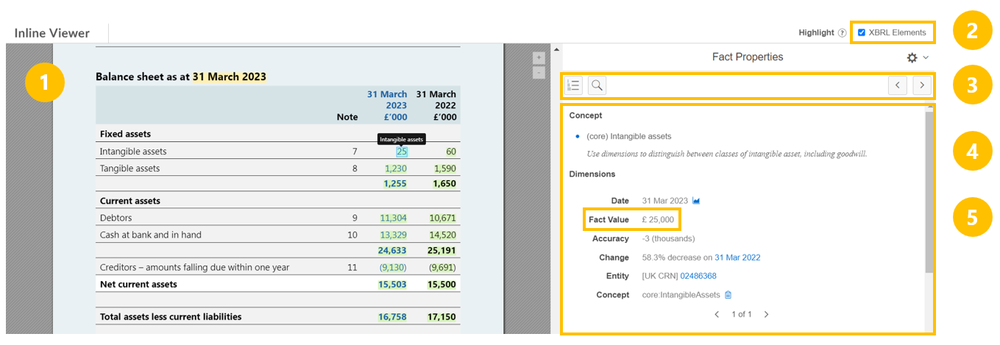
- The Annual Report document – to a human this is indistinguishable from the paper report
- Tick this box to highlight tagged information in the document (the green highlights in the image above)
- Navigation tools: document outline, search and previous/next buttons
- Information about the tagged information. This includes the name of the tag used (in this case, Intangible assets), period, an entity identifier etc.
- The value and units of the tagged concept. In this case £25,000
Tagged narrative information looks very similar:
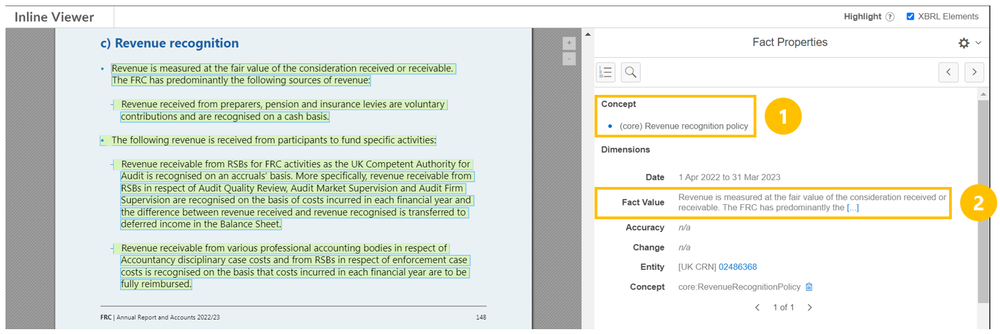
- Concept (tag) name (in this case Revenue recognition policy)
- The text content to which the tag applies (“Revenue is measured at…”)
The UK Viewer
You can also access digital reports via the UK iXBRL viewer. The UK iXBRL Viewer, is a new tool designed to improve free access to structured company reporting data.
The Viewer enables users to easily view and analyse iXBRL files, displaying tagged data within reports. This innovative tool represents a significant step forward in making company financial information more accessible and transparent to stakeholders.
Give the Viewer a try
Links
- UK iXBRL Viewer
- Video Demo of Digital Reporting Viewer
- Listen to our podcast on transforming access to company data
Where to go for more:
Introduction to the Digital Reporting Education resource centre