
The content on this page has been converted from PDF to HTML format using an artificial intelligence (AI) tool as part of our ongoing efforts to improve accessibility and usability of our publications. Note:
- No human verification has been conducted of the converted content.
- While we strive for accuracy errors or omissions may exist.
- This content is provided for informational purposes only and should not be relied upon as a definitive or authoritative source.
- For the official and verified version of the publication, refer to the original PDF document.
If you identify any inaccuracies or have concerns about the content, please contact us at [email protected].
XBRL Tagging Guide - FRC Taxonomies 2026
The FRC does not accept any liability to any party for any loss, damage or costs howsoever arising, whether directly or indirectly, whether in contract, tort or otherwise from any action or decision taken (or not taken) as a result of any person relying on or otherwise using this document or arising from any omission from it.
© The Financial Reporting Council Limited 2025
The Financial Reporting Council Limited is a company limited by guarantee. Registered in England number
- Registered Office: 13th Floor, 1 Harbour Exchange Square, London E14 9GE
- 1. Introduction
- 2. UK Taxonomy Suite
- 3. Taxonomy features and content
- 3.1 General requirements for taxonomy display
- 3.2 Taxonomy Objectives
- 3.3 General scope of taxonomies
- 3.4 Expected consumers of XBRL information
- 3.5 Principal taxonomy features
- 3.6 Dimensions
- 3.7 Groupings
- 3.8 Analysis items
- 3.9 References
- 3.10 Guidance information
- 3.11 Label styles
- 3.12 Balance type
- 3.13 Tags for textual information
- 3.14 Industry and Charity sector content
- 3.15 Changes from the previous UK accounts taxonomies
- 3.16 Taxonomy extensions
- 4. Principles of XBRL tagging
- 4.1 XBRL tagging – basic principles
- 4.2 Choice of taxonomies
- 4.3 Scope of tagging
- 4.4 Choice of tags
- 4.5 Significant numeric data
- 4.6 No tag available
- 4.7 Alternative tags
- 4.8 Unique application of tags
- 4.9 Tagging of multiple occurrences of data items
- 4.10 Tagging of multiple occurrences of data items
- 4.11 Use of 'generic' tags
- 4.12 Use of 'fixed value' tags
- 4.13 Use of analysis items
- 4.14 Non-standard dimension tags
- 4.15 Use of tags for 'Other...' data
- 4.16 Use of grouping tags
- 4.17 Tagging of text
- 4.18 Use of 'free-text comment' tags
- 4.19 Tagging of footnotes
- 4.20 Tagging of comparative data
- 4.21 Compulsory tags
- 4.22 Unreported data
- 4.23 'Not applicable' tag
- 4.24 Nesting of tags
- 4.25 Distinction of company and group data
- 4.26 Revised data
- 5. Entry of data values
- 5.1 Entry of data entry - introduction
- 5.2 Entry of numeric data – basic principles
- 5.3 Positive and negative values
- 5.4 Accuracy of values
- 5.5 Period Context
- 5.6 Range of values
- 5.7 Dates
- 5.8 Percentages
- 5.9 Entity context
- 5.10 Use of XBRL nil values
- 5.11 Entity context
- 5.12 Naming conventions in XBRL reports
- 6. Taxonomy information
- 7. Deprecation Policy
- Appendices
1. Introduction
This guide sets out the main principles involved in creating accounts in eXtensible Business Reporting Language, XBRL, under the FRS 101, FRS 102, FRS 105, Charities FRS 102 SORP and IFRS standards in the United Kingdom and Republic of Ireland.
It is aimed at all those preparing or consuming reports based on the XBRL taxonomies published for those standards by the Financial Reporting Council (FRC).
The guide assumes readers are already familiar with the basic principles underlying XBRL, its use in the UK and in particular the content of the XBRL Guide for UK Businesses, which provides an introductory explanation and is available from HMRC on GOV.UK at https://www.gov.uk/government/publications/corporation-tax-technical-specifications-xbrl-and-ixbrl.
This guide is concerned with the correct use of the machine-readable XBRL tags defined by the UK Taxonomy Suite. It sets out a number of rules for the appropriate use of these tags.
It only deals with accurate conversion of accounts into XBRL. It does not cover the process and requirements for submission of filings to HMRC, Companies House or other agencies. That is covered in guidance published by those organisations.
The Taxonomy Suite and other supporting information are published on the FRC website at https://xbrl.frc.org.uk/. A Developers' Guide provides information aimed at developers of software for preparing or consuming XBRL reports based on the taxonomies. A set of Consistency Checks documents which aid developers in creating checks on summation and consistent tagging of accounts and are available on the FRC website.
Conventions used in this guide
When stating rules, this guide uses the following conventions to indicate requirement levels, based on [RFC2119] published by the IETF organisation. (These conventions are not the same as those used by the FRC in publications on accounting standards.)
MUST: This word, or the terms "REQUIRED" or "SHALL", means that the definition is an absolute requirement.
MUST NOT: This phrase, or the phrase "SHALL NOT", means that the definition is an absolute prohibition.
SHOULD: This word, or the adjective "RECOMMENDED", means that there may be valid reasons in certain circumstances to ignore a particular item, but the full implications must be understood and carefully weighed before choosing such a course.
SHOULD NOT: This phrase, or the phrase "NOT RECOMMENDED", means that there may be valid reasons in certain circumstances when the particular behaviour is acceptable, but the full implications should be understood and carefully weighed before adopting it.
MAY: This word, or the adjective "OPTIONAL", means that an item is truly optional.
Rules
Main rules set out in the document are highlighted using the following convention:
RULE
Text of rule
Rules are identified by the numbering of the section in which they appear.
Comments and questions
Comments and questions on this guide should be directed to [email protected].
2. UK Taxonomy Suite
This guide covers the FRC Taxonomy Suite, the Irish Taxonomy, and the Charities Taxonomy developed by the Financial Reporting Council (FRC).
2.1 FRC Taxonomy Suite
FRS-102
This entry point defines elements for FRS 102 The Financial Reporting Standard applicable in the UK and Republic of Ireland and is useful for companies filing financial statements prepared in accordance with FRS 102 and FRS 105.
IFRS
This entry point defines elements for IFRS Accounting Standards that have been endorsed by the UK Endorsement Board and is useful for companies filing financial statements prepared in accordance with IFRS Accounting Standards.
FRS-101
This entry point is useful for companies filing financial statements prepared in accordance with FRS 101 Reduced Disclosure Framework, which enables subsidiaries and ultimate parent companies to take advantage of disclosure exemptions in comparison to the requirements in IFRS Accounting Standards.
IFRS-UKSEF
This entry point is useful for companies filing their annual consolidated report using the multiple target documents approach (UKSEF approach) to use elements (e.g. SECR concepts) from the FRC Taxonomy Suite for the “UKFRS" target document and to tag parent company data for the purpose of annual statutory accounts reporting to Companies House. This entry-point is equivalent to the corresponding IFRS entry-point, but preparers must use the UKSEF variants to ensure that any future UKSEF-specific variations or additions to the FRC Taxonomy Suite are in scope of the report.
FRS-102-UKSEF
This entry point is useful for companies filing their annual consolidated report using the multiple target documents approach (UKSEF approach) to use elements (e.g. SECR concepts) from the FRC Taxonomy Suite for the “UKFRS" target document and to tag parent company data for the purpose of annual statutory accounts reporting to Companies House. This entry-point is equivalent to the corresponding FRS-102 entry-point, but preparers must use the UKSEF variants to ensure that any future UKSEF-specific variations or additions to the FRC Taxonomy Suite are in scope of the report.
DPL
The Detailed Profit & Loss taxonomy has, for a number of years, been a separate taxonomy owned and managed by HMRC, for use in combination with either the FRC Taxonomy Suite or HMRC's own Tax Computation Taxonomy. In versions from 2022 onwards, the elements of the standalone DPL Taxonomy have been included in the FRC Taxonomy Suite and are available in this separate entry point as well as in the other applicable entry points.
CIC-34
This entry point defines elements for requirements stipulated in section 34 of the Companies (Audit, Investigations and Community Enterprise) Act 2004 and contain the information required by Part 7 of the Community Interest Company Regulations 2005 (SI 2005/1788). This entry point is useful for community interest companies (CICs) for filing their CIC-34 report. The CIC-34 report serves as a comprehensive reflection of a CIC's activities and the benefits it has contributed to the community over the past year. The annual accounts of CICs need to be filed using a different appropriate entry point from the FRC Taxonomy Suite.
DSEP-AA06
This entry point defines elements for the statement of guarantee from the parent company
- form AA06 - which is part of the Dormant Subsidiary Exempt Package, used for both filing-exempt and audit-exempt subsidiaries.
DSEP-Agreement
This entry point defines elements for the written notice of agreement by the subsidiary's members which is part of the Dormant Subsidiary Exempt Package, used for both filing-exempt and audit-exempt subsidiaries.
2.2 Charities Taxonomy
The Charities Taxonomy extends the FRC Taxonomy Suite and provides one entry point for preparing a report:
Charities
This entry point extends FRS-102 from the FRC Taxonomy Suite and defines additional elements for Statement of Recommended Practice (SORP) applicable to charities preparing their accounts in accordance with the Financial Reporting Standard (FRS 102) applicable in the UK and the Republic of Ireland.
2.3 Irish Taxonomy
The Irish Taxonomy extends the FRC Taxonomy Suite and provides the following entry points for preparing a report:
FRS-101
This entry extends FRS-101 from the FRC Taxonomy Suite point is useful for companies filing financial statements prepared in accordance with FRS 101 Reduced Disclosure Framework to the Revenue Commissioners of Ireland. It enables subsidiaries and ultimate parent companies to take advantage of disclosure exemptions in comparison to the requirements in IFRS Accounting Standards.
FRS-102
This entry point extends FRS-102 from the FRC Taxonomy Suite and is useful for companies filing financial statements prepared in accordance with FRS 102 The Financial Reporting Standard applicable in the UK and Republic of Ireland to the Revenue Commissioners of Ireland.
EU IFRS
This entry point extends IFRS from the FRC Taxonomy Suite and is useful for companies filing financial statements prepared in accordance with IFRS Accounting Standards to the Revenue Commissioners of Ireland.
2.4 UKSEF approach
In 2023, UKSEF Taxonomy was re-architected to support Multiple XBRL Target Documents, eliminating the need for an explicit UKSEF Taxonomy. At a minimum, the purpose of the UKSEF approach is that the tagged consolidated financial statements that comprise an ESEF report are augmented by UK-specific tagging of information legally required by Companies House for the individual parent entity. Readers are referred to the UKSEF Guidance documentation on the FRC Taxonomies website for full information.
2.5 Welsh labels
From 2022 version onwards, the UK Taxonomy Suite (with the exception of the Irish Taxonomy) include a complete set of Welsh labels in addition to English, enabling Welsh accounts preparers and taxonomy browsers to see and understand the contents of the taxonomies in their native tongue (if enabled by their taxonomy-aware software).
2.6 Description of the FRC Taxonomies
The standards share a range of common accounting concepts. This reflects the fact that in developing the standards, the FRC aimed to provide standards consistent with international accounting standards through the use of an IFRS-based solution, unless there was a clear need for an alternative approach in specific areas.
The FRC accounts taxonomies thus contain a common 'core' schema, which defines the XBRL elements for accounting concepts and determines the key features of the design. Applicable entry points extend this core schema so that it presents the range of XBRL elements which are appropriate for the standard concerned.
The accounts taxonomies also contain common components to handle basic entity and business report data, the Directors' Report, the Audit Report, an accountant's report and a detailed profit & loss statement.
The FRC taxonomies cover the reporting requirements for typical commercial and industrial entities and charities and contain additional sections to meet the requirements of the banking and finance sector and the extractive industries sector, including mining, oil and gas.
The taxonomies may be extended over time to cover further standards and the requirements of specific industry sectors. The general design principles and tagging requirements set out in this guide are expected also to apply to such extensions.
The taxonomies can be downloaded as a zip file from the FRC website at https://xbrl.frc.org.uk/ and are available for viewing over the internet at https://uk-taxonomies-tdp.corefiling.com/yeti.
Section 3 summarises the main features of the taxonomies.
Section 4 covers the main principles of applying XBRL tags from the taxonomies.
Section 5 explains key aspects of data entry in XBRL.
Section 6 provides further information on the taxonomies and their structure.
3. Taxonomy features and content
3.1 General requirements for taxonomy display
Taxonomies lie at the core of XBRL, defining the individual tags which identify items of business data.
They are more than simple lists of machine-readable tags linked to human-readable labels which identify the tags. Taxonomies include a range of features to identify tags uniquely and unambiguously, to enable a wide range of data to be tagged clearly and efficiently, to aid ease of use and to allow software to process XBRL data effectively. They have to be sufficiently flexible to handle a great variety of content and formats of reporting.
Those involved in the creation or consumption of XBRL reports, whether as taggers or analysers of accounts or as developers of software, must understand the content, features and structure of taxonomies.
3.2 Taxonomy Objectives
The over-arching objective is to provide taxonomies which enable the efficient preparation of legally compliant corporate reports in XBRL. The content of the taxonomies is derived from current UK regulations and are designed to be used by companies and entities to meet the relevant legal reporting requirements.
Separately to tags provided to meet legal requirements, the taxonomies should include tags to digitally disclose additional types of information that filers have in their paper reports. Filers may elect to tag these at their own discretion as there is no legal obligation to do so.
The objectives are all relevant and the order of them does not denote a ranking or relative importance. In devising the objectives, the needs of users and regulators are given equal weighting. It should be noted that UK regulators may have differing priorities regarding objectives for the taxonomies, however the following objectives are high level and apply to all regulators.
This means taxonomies which:
- Generate quality structured data.
- Clearly and accurately define the XBRL tags needed to identify specific information.
- Cover financial, non-financial and narrative elements within annual and other corporate reports which is useful for analysis, comparison, or review by existing and potential consumers of XBRL reports.
- Are easy and efficient to use.
- Provide clear and consistent tagged information which can be used effectively by consumers of XBRL information.
3.3 General scope of taxonomies
The taxonomies should, as far as is practical:
- Be in line with technology available in the marketplace and with relevant regulatory scope and remit.
- Enable tagging of financial statements and other key monetary and numeric data in the main body of financial statements, to ensure compliance with regulations.
- Facilitate tagging, for the purposes of identification, of all textual information which is important to the interpretation and meaning of an annual report and accounts. This means high-level tagging to indicate the presence and scope of particular textual statements, but not necessarily granular tagging of the detailed components of such statements.
- Play a role in encouraging the creation of further taxonomies and the embedding of a digital focus for FRC core policy areas through a combination of innovation, outreach, promotion, and education activities.
It is not practical to define tags to cover every eventuality or item which may be reported in annual reports. However, appropriate techniques, such as the use of analysis tags, enable comprehensive tagging of most financial schedules in accounts without requiring a particularly large number of tags in the taxonomies.
Despite the general aims, particular areas of reporting may not be in scope for detailed tagging where these are:
- Very varied in content and form across companies.
- Highly specialised – either in general or for the sector concerned.
- Not expected to be a high priority for analysis by likely users of accounts.
Areas of reporting have been excluded from detailed tagging if they meet at least two of these criteria.
3.4 Expected consumers of XBRL information
The taxonomies are intended to support XBRL tagging of accounts which will meet the needs of a variety of users and consumers of financial reports, including:
- Tax authorities, which require accounts information for tax risk analysis and for tax policy analysis and planning.
- Government departments which require business data for policy, statistical and other official purposes.
-
Investors, information companies, banks, credit agencies, other organisations and the public who may require company financial data in an efficient way from Companies House or the FCA.
-
Donors and regulators such as the Charity Commission.
The design and content of the taxonomies are thus intended to meet the requirements of a broad range of consumers of financial information. They are intended to support increasing use of XBRL in future.
3.5 Principal taxonomy features
a. Labels
The human-readable labels on tags provide their main definition – as far as possible, they uniquely identify the tag concerned. Labels in taxonomies are typically longer and more explicit than descriptions of line items in financial reports. For example, a taxonomy label will say 'Tax on profit or loss on ordinary activities' not just 'Tax'. As of 2022, all labels are provided in Welsh as well as English.
b. Presentation view
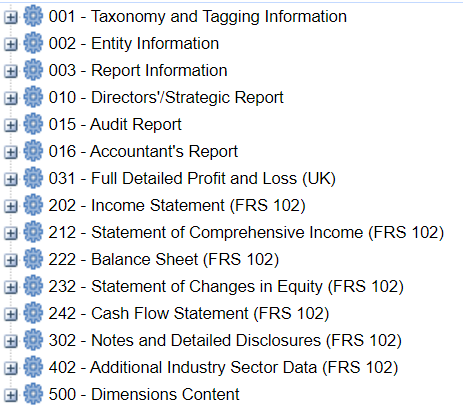
Taxonomies are presented in the same format as the financial reports they typically represent. They mirror the basic structure of accounts, with primary statements followed by notes and detailed disclosures. Figure 1 shows the basic structure of the FRS 102 taxonomy.
 Figure
- The top-level structure of the FRS 102 taxonomy. The numbering of sections is purely for ordering and identification.
The position of a tag in the presentation hierarchy of a taxonomy will give a strong indication of its use and meaning. For example, 'Tax on profit or loss on ordinary activities' will appear in the income statement section of the taxonomy between profit before tax and profit after tax. Some tags may appear in multiple places in the presentation view because they may typically be reported in different positions in accounts.
The presentation of a taxonomy is a 'common denominator view' which reflects the typical positioning of items in accounts. It is intended purely to help users locate and identify tags in the taxonomy. It does not define how items should be presented in accounts filed in Inline XBRL that is determined by the preparer. Companies are not expected to adjust the presentation of their accounts to fit the taxonomies. Given the wide variety of presentations of accounts which entities may use, the presentation view is very unlikely to match exactly the organisation of any individual set of accounts.
Taxonomy tags are arranged in hierarchies, with more detailed tags appearing 'below' major ones like totals. This is intended to enable efficient presentation on screen. Items representing totals will typically be the 'parent' of items which are components of the total. The ordering of totals and component items will thus often be the opposite of that seen in printed accounts, in which a total will appear at the bottom of a list of its components.
c. Headings and other information items
The taxonomies include heading items to help organise the presentation view and guidance and cross-reference items to provide explanation. These are defined as XBRL 'abstract' items and cannot be used in the tagging of accounts. Their labels end with a term in square brackets, such as [heading] or [guidance] to help identify them. They also have matching 'data types', such as 'heading item type' or 'guidance item type' to identify them to software.
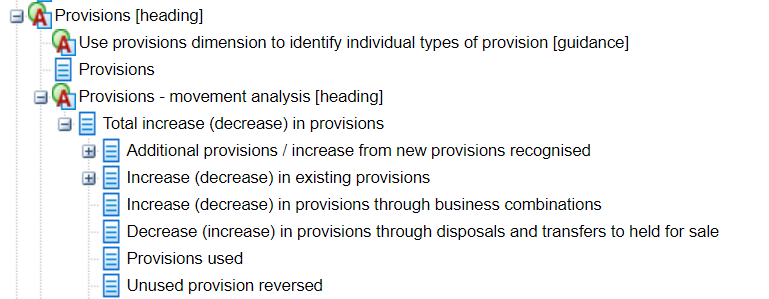
Figure 2 below shows the presentation of part of FRS 101 Provisions section, including heading and guidance items. This provides a typical view of the arrangement of tags in a presentation hierarchy.
 Figure
- Part of the Provisions section from FRS 101 showing heading and guidance items. The + sign indicates that more tags exist as children of the tag concerned.
d. Data types
Taxonomy tags are assigned a 'data type' to identify their meaning and role and to assist in processing XBRL data. The data types used in the FRC taxonomies are:
- Monetary (to represent monetary values)
- String (to represent ordinary textual information)
- Decimal (to represent ordinary numbers)
- Shares (to represent numbers of shares, options, and related instruments)
- PerShare (to represent values per share)
- Percent (to represent percentage values)
- Date (to represent specific dates in a yyyy-mm-dd format)
- Boolean (to represent true / false statements)
- URI (to represent URIs)
- Domain item (part of a dimension, explained later in this guide)
- Pure (to represent pure values)
- Energy (to represent energy values)
- Greenhouse gas emissions (to measure Global Warming Potential)
- Nonnegative decimal (to represent nonnegative ordinary numbers)
- Fixed item (special text item with fixed value, explained later in this guide)
- Grouping item (special item heading a grouping, explained later in this guide)
- Guidance item (an item providing guidance)
- Heading item (an item acting as a heading of a section)
- X-ref item (a guidance item acting as a cross-reference)
The vast majority of tags are either monetary or string. The use of these types helps to ensure correct entry of data in XBRL reports and more effective verification by software.
For example, the tag 'Operating profit (loss)' is a monetary type, whereas 'Basis of audit opinion' is a string.
e. Dimensions
Dimensions represent the different forms in which financial data may be represented. Typically, they may be thought of as identifying the different columns in a table of information, while ordinary line item tags represent the rows. They are explained in section 3.6 below.
f. Groupings
A grouping contains a set of tags which describe aspects of a particular piece of information and are expected to be used in combination. They are described in section 3.7 below.
g. References
References for a tag state the sections in authoritative documents which define or explain the concept which the tag represents. References are helpful in identifying the meaning of a tag and explaining its use. All accounting line item tags in the FRC taxonomies carry one or more accounting references. Typically, these state the publication concerned and the section or paragraph defining the tag. References used in the taxonomies are described in section 3.9 below.
h. Period type
All tags are identified as being either related to an 'instant' (i.e. a stock) or a 'duration' (a flow). This relates to the period at which or over which they are measured. This information helps to identify tags and ensure correct data entry and validation of reports in XBRL.
i. Balance type
Where appropriate, monetary tags are identified as either a 'credit' or 'debit' balance type. This helps to confirm their identity and the correct sign on their monetary values. Section 3.12 gives more information on the application of balance types.
j. Documentation field
The documentation field on a tag provides guidance on how the tag should be applied and interpreted. The field is only used where such guidance necessary. The majority of tags do not carry such guidance. However, where it exists, documentation guidance is important to understanding the correct use of a tag. Figure 3 shows some an example of a documentation field.
| Type | Lang | Label |
|---|---|---|
| Standard Label | en | Entity is dormant [true/false] |
| Documentation | en | Include tag as 'TRUE' if statement applies. No tagging required if 'FALSE' |
| Standard Label | cy | Endid yn segur [gwir/anwir] |
| Documentation | cy | Cynhwyswch tag fel 'GWIR' os yw'r datganiad yn gymwys Dim angen tagio os yn 'ANWIR' |
 Figure
- The documentation field on a Boolean tag which takes a 'true / false' value.
k. Name
The 'name' of a taxonomy tag is its unique machine-readable identifier. This is not an abstract string of characters. The name is derived from the tag label to make it easy for developers to read and decipher underlying XBRL files. Ordinary users should never need to be aware of the tag names. An example is 'OperatingProfitLoss' which is the name for the tag labelled 'Operating profit (loss)'.
3.6 Dimensions
3.6.1 Dimensions – general description
Taxonomy dimensions represent the different forms in which financial data may be reported. They identify the standard breakdowns, such as for continuing or discontinued operations, under which information may appear.
For example, operating profit may be reported for continuing and discontinued operations, for geographic or other segments or for the company or group. It is not practical to represent all these different forms of operating profit by individual tags in the taxonomy. Instead, a single line item tag is used to identify the 'Operating profit (loss)' concept, while the standard breakdowns are represented in the taxonomy by dimensions.
In practice, dimensions will often represent the columns in a financial table, while ordinary line item tags represent the rows. However, dimensions are not necessarily limited to representing such columns or to use with tables.
In the FRC taxonomies, dimensions are used, among other things, to distinguish:
- group from company data
- original and revised data
- continuing and discontinued operations
- classes of equity
- classes of property, plant and equipment
- classes of intangible assets
- classes of provisions
- individual geographic, operating and other segments
- individual subsidiaries, joint-ventures and associates
- restated information, including prior period adjustments
- individual acquisitions or business combinations
- a wide range of data related to financial instruments
- individual pension schemes
- individual directors
In total, more than 120 dimensions (including Charity-specific dimensions) are used in the taxonomies.
Each dimension includes a range of dimension member tags. For example, the property, plant and equipment classes dimension contains tags for 'land and buildings', 'vehicles, plant and machinery' and so forth.
Dimension tags are always used in combination with ordinary line item tags. For example, the line item tag 'Increase (decrease) in property, plant and equipment' is used in combination with the PPE classes dimension. This enables increases from different classes of assets to be tagged accurately and efficiently.
Different dimensions may be used simultaneously with a line item tag. For example, the dimension tags for continuing and discontinued operations may often be used in conjunction with other dimensions.
The taxonomies define the dimension tags which may be used with each ordinary line item tag. They also define which dimension tags may be used simultaneously. In other words, the taxonomy predefines the forms of financial tables which can be represented by the taxonomy. In practice, it enables a far richer set of tables than will normally be needed in an individual company report. However, it does not permit line item tags to be used with inappropriate dimensions. Attempts to do so will lead to an invalid XBRL report. The taxonomy presentation view shows the range of available dimensions in the section '500 – Dimensions Content', which can be seen at the foot of the list of sections in figure
- However, the presentation view does not attempt to show which dimension tags may be used with each line item tag.
XBRL accounts software should show what dimension tags are available for use with each line item tag and guide users in their correct application.
All usable line item tags in the accounts taxonomies are tied to a number of dimensions which may be used in conjunction with them. At a minimum, line item tags are usually linked to the basic dimensions distinguishing group and company data and restated information.
3.6.2 Dimensions – default tags
Most dimensions contain default tags, which are considered to apply if no specific tag from the dimension is selected.
For example, the default member of the PPE classes dimension is 'Total property, plant and equipment'. Any PPE line item tag which is not used in combination with a specific tangible asset dimension member is thus considered as representing the total across all classes. All default tags include the word [default] in square brackets at the end of their label.
The defaults for the broadly used group / company and restatements dimensions are 'Company [default]' and 'Currently stated amount [default]', respectively.
The availability of default tags is intended to reduce the effort involved in tagging. In practice, many line items in accounts are likely to be reported using defaults, without a need for explicit tagging with dimension tags. Many defaults represent the total for the dimension, although that is not always the case. The application of dimensions in tagging is covered in more detail in section 4.
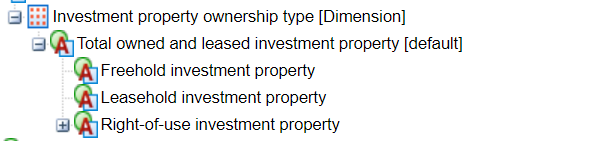
Figure 4 shows examples of two dimensions, one distinguishing internally and externally acquired intangible assets and the other distinguishing freehold and leasehold investment property, including their defaults.

 Figure
- Examples of two dimensions showing their defaults.
Some dimensions have the default tag 'Not applicable [default]'. This means that the dimension is not relevant to the line items to which it is linked, unless the user actively selects a tag from the dimension. It effectively means the dimension can be ignored, until it is specifically applied.
3.6.3 Generic dimension tags
A number of dimensions contain 'generic' tags to represent certain classes or breakdowns of information. These are used when the precise name of each member of the class is not known in advance. Examples include individual directors, individual subsidiaries and the like.
The generic tag label describes the class and is then followed by a number to identify the individual tag. Examples include 'Director 1', 'Director 2'... and 'Subsidiary 1' 'Subsidiary 2' and so forth.
These generic dimensions are associated with a name or description line item tag to enable the use of each generic dimension tag to be identified. For example, the tag 'Name of entity officer' is linked to the entity officers dimension containing the generic director tags. The tag 'Name of subsidiary' is tied to the subsidiaries dimension identifying individual subsidiaries.
In this way, individual breakdowns of such classes can be reliably tagged and identified.
Tagging rules require that generic dimension tags are applied consistently within a report and that name or description tags are correctly used. These rules are set out in full in section 4.11.
Dimensions containing generic tags will also contain explicit tags. For example, the entity officers dimension contains tags for total entity officers, chief executive and specific roles, while the subsidiaries dimension contains tags for total and other subsidiaries.
Dimensions which have some generic members include:
- Entity officers: identifying individual directors and Trustees.
- Subsidiaries: identifying individual subsidiaries.
- Associates: identifying individual associates.
- Joint ventures: identifying individual joint ventures.
- Related parties: identifying various individual types of related party.
- Post-employment benefit plans: identifying individual plans
- Business combinations: identifying individual business combinations.
- Share-based payment arrangements: identifying individual arrangements.
- Share-based payment grants: identifying individual grants.
- Share classes and share types: identifying individual classes and types.
- Operating segments: identifying individual operating segments.
A full list of dimensions with generic tags is shown in Appendix A.
Generic dimension tags are similar to but not the same as 'non-standard' or 'further item' dimension tags, also containing a number in the label, which are included in some dimensions to enable non-standard or unpredictable cases to be tagged. These are described in section 3.6.4 immediately below.
3.6.4 'Non-standard' and 'further item' dimension tags
Some dimensions contain 'non-standard' or 'further item' dimension tags to handle breakdowns or classes of information which cannot be fully defined in advance.
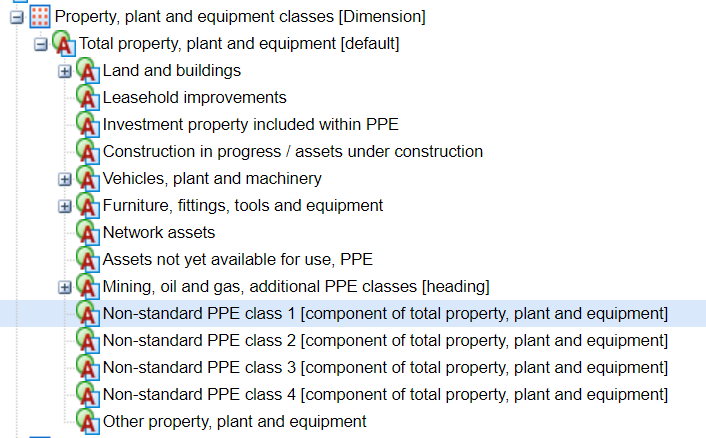
For example, the PPE classes dimension contains four dimension tags for 'non-standard PPE classes' intended for breakdowns of PPE not covered by the available tags for specific classes. The dimension is shown in figure 5.
 Figure
- PPE classes dimension showing 'non-standard' dimension tags.
The 'Non-standard PPE class 1 [component of total property, plant and equipment]' and other similar tags are purely intended to represent unpredictable items and should only be used for direct components of the total they refer to. Such tags should not be used when existing explicit dimension tags will adequately cover the data concerned.
Similarly, figure 6 shows a set of 'further item' dimension tags from the finance leases contract type dimension. These are intended to represent unpredictable, specific types of contract.
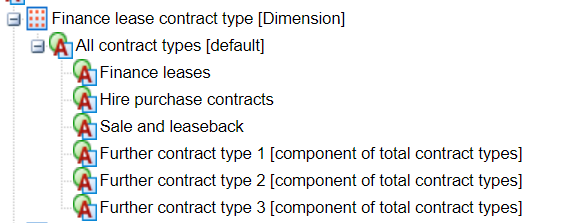 Figure
- Dimension show 'further item' dimension tags.
The 'non-standard' and 'further item' dimension tags differ from generic tags in that they do not represent a general class of items, such as subsidiaries, and are NOT associated with a particular name or description tag. They are effectively anonymous.
They are purely intended to enable complete tagging where unusual or unpredictable classes of data occur in accounts. Guidance and rules for their use are covered in section 4.14.
3.6.5 Typed dimensions
Typed dimensions are a special type of dimension. They do not contain a set of specific, predefined dimension tags, unlike the 'explicit dimensions' which have been described in preceding sections.
Instead, typed dimensions contain a set of tags defined by some general property, such as 'text string, intended to represent name of football team'. They are governed by the same general rules as explicit dimensions, but cannot have a default, since by definition they do not include an explicit tag which could serve as a default.
The typed dimensions used in the UK accounts taxonomies have been defined as containing dimension tags represented by positive integers (1, 2, 3, 4 etc.). Their content is thus anonymous. The number of dimension tags they contain is not limited.
The purpose of typed dimensions is to enable multiple occurrences of the particular line item tags to which they are attached.
Effectively, typed dimensions provide “anonymous” dimension tags that enable a line item tag to be reused any number of times in a report, provided it is associated with a different typed dimension integer tag in each case.
Typed dimensions are being used to enable the creation of 'analysis items', as explained in section 3.8, and to support groupings, as explained in section 3.7.
Typed dimensions are not tied to a required name or description tag whose purpose is to identify the meaning of each individual typed dimension tag (although some are linked to groupings which happen to contain a name or description item for more general purposes).
They differ from generic dimensions in not being tied to a name tag, not containing any total or other explicit tags and not having a default. Instead, they just follow a simple integer pattern.
3.7 Groupings
A 'grouping' is used to contain tags which describe related aspects of a particular piece of information and which are expected to be used in combination. Such tags will only be properly understood when seen in conjunction with one another.
A grouping may often need to be used repeatedly in an XBRL report in order to cover multiple occurrences of the particular piece of information it describes.
Typically, groupings are used to handle narrowly defined, detailed information.
For example, a grouping is used for the tags which cover specific advances or credits to directors. This grouping includes tags that represent (a) a description of a specific advance and (b) its monetary amount. Clearly, these tags only take proper meaning when seen in combination. The tags may be reused in different occurrences of the grouping to tag different loans for different purposes to a particular director.
Another example is a grouping for specific loans from banks. This contains tags for a description of a loan and its amount. These tags may be repeated to handle different loans covered in a report. The grouping is shown in figure 7.
 Figure
- Example of a grouping.
Groupings can be easily identified because the parent item always carries the word [grouping] in square brackets at the end of the label. The parent also has a 'grouping item' data type. This parent is simply a container and is not itself used in tagging.
All tags in the grouping are attached a grouping typed dimension to identify each occurrence and to enable them to be repeated as required in a report. Tags used within an individual occurrence (i.e. referring to the same piece of information) must carry the same typed dimension number. Different occurrences must carry different typed dimension numbers – otherwise invalid duplicate tags will result.
Tags in groupings may be attached to any range of dimensions in addition to the grouping typed dimension. Guidance and rules for applying grouping tags are covered in section 4.16.
3.8 Analysis items
Line items tags known as 'analysis items' have been included in number of sections of the taxonomies to enable the tagging of entries in accounts for which no specific tag exists.
Each analysis item tag is specific to the section in which it appears and is defined as a component of the total monetary value for the section. It is attached to the analysis typed dimension, enabling it to be repeated multiple times if required.
The purpose of analysis items is to support complete tagging of the section in which they appear and, where appropriate, the summation of the data in the section to be checked.
Analysis items can be recognised through their label, which takes a standard form, described below. Software can also identify them through their attachment to the analysis typed dimension.
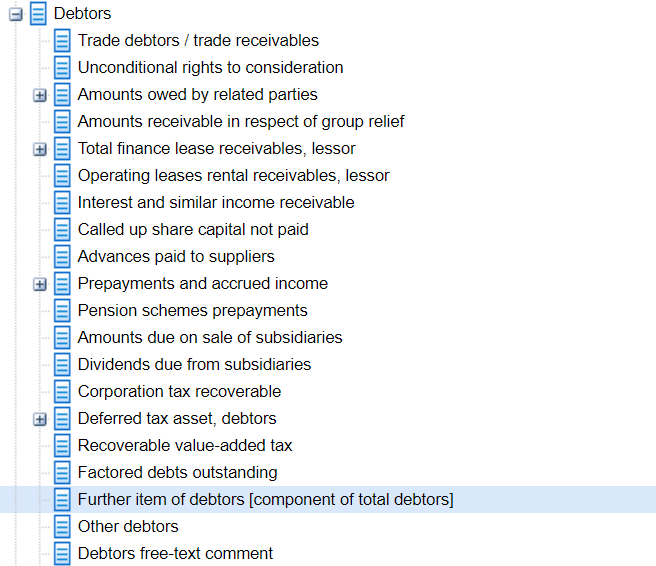 Figure
- Debtors section showing analysis item.
The analysis item is 'Further item of debtors [component of total debtors]'. This is intended for tagging any direct component of debtors which cannot be tagged using the other line item tags in the taxonomy.
The debtors analysis item can be used multiple times to tag different debtors entries, provided it is used with a different integer value of the analysis typed dimension for each different line item.
Analysis item labels always take the form 'Further... [component of...]' or, very occasionally, 'Specific... [component of....]'. The 'specific' formulation only occurs where the analysis item is the only child tag of the total to which it belongs. An example of this case is shown in Figure 9.
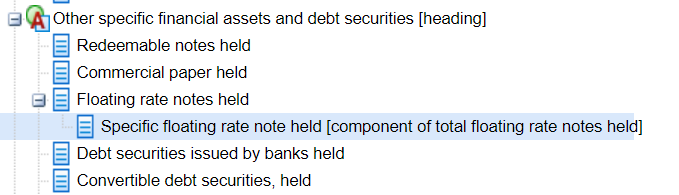 Figure
- Analysis item with 'Specific' label
These analysis items with a 'Specific...' label would be used where a report contains breakdowns of a total item, but does not include the total itself, such as the total for floating rate notes, as in this example.
The positioning and labelling of analysis item tags makes clear the section to which they belong and the total item in which they are included.
Since the typed analysis dimension domain is defined simply as a positive integer, the typed dimension tags themselves do not carry meaning. No name or description tag is associated with the individual dimension values. No significance attaches to the particular integer value used. Consumers of iXBRL reports will need to look at the content of the Inline XBRL document if they wish to see a specific description of the item concerned.
Analysis items are only included in sections where they are likely to be required – they are not included as routine within all sections of the taxonomy. The latter approach would lead to redundant tags and might encourage incorrect or loose tagging.
It is understood that the use of analysis items will not guarantee that a particular section will always sum correctly according to a simple formula. The variability of items which may be included in some financial aggregations may mean the summation implied in a taxonomy will not match that used in some specific accounts. For example, companies may apply varying definitions to what is contained within sections such as operating income, non-operating income and revenue. However, the use of analysis items will: (a) enable more complete tagging, (b) allow summation to be confirmed in many cases, (c) encourage checks on the correctness of tagging where summation fails.
Rules and guidance on the use of analysis items is covered in section 4.13.
3.9 References
References to financial reporting standards and other authoritative literature provide confirmation of the meaning of a taxonomy tag and the authority for its use. Software providers should make tag references available for users to view easily and efficiently in any software which supports manual tagging choices.
References in the Taxonomies adhere to the following practices:
- All accounting line item tags carry one or more references to accounting standards or legislation.
- References have a 'reference role' identifying the standard(s) or legislation to which they relate, such as FRS 102. They contain the name of the publication identified by acronym (such as FRS for Financial Reporting Standard, CA for Companies Act) and the numbers of the publication, schedule, paragraph or similar information which define the concept. Figure 10 shows an example of a reference.
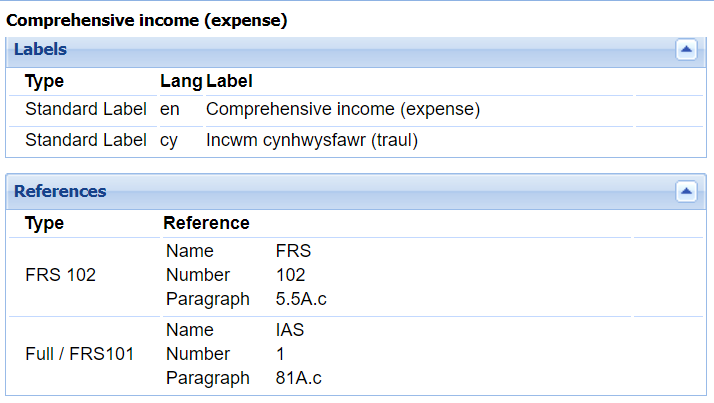 Figure
- References for tag for comprehensive income. In this display, 'type' shows the 'reference role' identifying the standard to which the reference applies.
- IFRS and FRS 101 accounting content has references to the IFRS Accounting Standards.
- FRS 102 accounting content has references to the FRS 102.
- Charities SORP content has references from Charities SORP and FRS 102.
- Taxonomies also include references to the Companies Act, Charities Act, Auditing Standards and other official publications, where appropriate.
-
References related to different standards are available across all taxonomies. (Technically, they are contained in reference linkbases which are common to all taxonomies.) An FRS 102 entry point user can thus see the references for IFRS Accounting Standards and FRS 101, as well as FRS 102. This comprehensive reference information should benefit users by providing complete information on the authority for a tag.
-
All references are to specific sections of official standards. We have avoided the use of generalised terms within references such as 'derived practice' or 'common practice'.
- Dimension tags do not in general carry references since their broad use means that specific references to individual paragraphs in standards are not appropriate. However, country, currency and language dimension tags carry International Standards Organisation (ISO) references to confirm the identification of tags concerned.
- References to IFRS Accounting Standards, FRS 101 and FRS 102 use only 'Name', 'Number' and 'Paragraph' reference parts. References to the Companies Act and similar publications may use other parts as required, such as 'Schedule' and 'Year'. 'Paragraph' is the most detailed 'reference part' used for textual standards in the taxonomies. The taxonomies do not use reference parts representing sub-divisions of paragraph such as clause or sub-clause. Such subdivisions are represented by components within the paragraph reference, with each component separated by a stop (.). An example is 'para: 3.c.ii'. Brackets are not used to separate components. This approach provides simplicity of presentation. It also avoids difficulties in determining consistently what is a sub-para, clause, sub-clause and the like, since standards do not necessarily explicitly define such distinctions.
- Where a reference relates to a range of paragraphs or sub-divisions of paragraphs, the range is shown within a single reference field. For example, a reference relating to paras 31, 32 and 33, is shown as 31-33 in the paragraph field. This is not shown as three separate individual references to para 31, para 32 and para 33. This applies even if the sections are not contiguous. For example, a reference to para 32, clauses (a) and (c) is shown as 'para: 32.a,c', not as separate references to 'para: 32.a' and 'para: 32.c'. References to a range use a dash (-) as separator. References to closely tied, non-contiguous items use a comma as separator. This approach is intended to simplify the presentation and viewing of references by users. Clearly, if two or more references are genuinely separate and relate to entirely different sections of a standard or to different standards, then separate references are used.
3.10 Guidance information
As described in section 3.5, the taxonomy includes information to guide users in correctly applying the taxonomy.
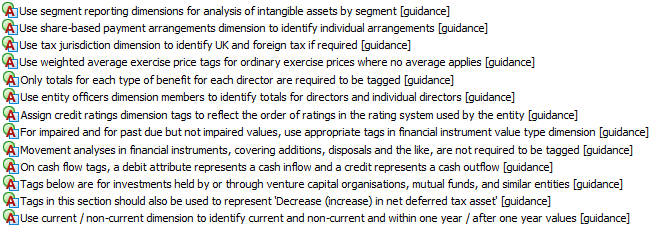
Guidance tags provide reminders on the use of dimensions, guidance on how a set of tags should be used and similar help. They contain the word [guidance] at the end of their labels have a 'guidance item' data type. (The latter enables easy identification by software and special display if required.)
Guidance items cannot give full explanations on all aspects of taxonomy use – that is the role of this and other documents – but they provide prompts and reminders of some key points to users. Figure 11 shows some examples of guidance tags.
 Figure
- Examples of guidance tags
The majority of guidance tags are reminders on the use of dimensions for identifying certain types of information, but, as can be seen in Figure 11, guidance tags also provide important pointers on whether and how certain information should be tagged.
Cross-reference tags provide pointers to where tags for related information may be found. They are intended to help users navigate efficiently through the taxonomy. They contain [cross-reference] at the end of their labels and are of cross-reference item data type.
Cross-reference tags are connected to the section at which they point through the 'definition' section of the taxonomies. This should enable software developers to implement a form of hyperlinking in taxonomy displays, allowing users to jump directly to the cross-referenced section.
 Figure
- Examples of cross-reference tags.
Documentation fields provide additional information on the use of specific tags. One example is shown in figure 3, in section 3.5.
| Labels | ||
|---|---|---|
| Type | Lang | Label |
| Standard Label | en | Profit (loss) |
| Documentation | en | When ALL data is continuing and no discontinued values are reported, the 'continuing operations' dimension tag need NOT be individually applied. The default dimension tag representing the total value for continuing and discontinued values may be considered to apply. |
| Standard Label | cy | Elw (colled) |
| Documentation | cy | Pan fo'r HOLL ddata yn parhau ac na adroddir am werthoedd nad ydynt yn parhau, NID oes raid cymhwyso tag dimensiwn 'gweithrediad sy'n parhau' yn unigol. Gellir ystyried bod y tag dimensiwn diofyn sydd yn cynrychioli'r cyfanswm gwerth ar gyfer gwerthoedd sydd ac sydd ddim yn parhau yn gymwys. |
Figure
- Example of a documentation label.
Documentation fields provide important guidance on the correct use of tags.
The use of documentation fields has been restricted to line item tags. They have not been applied to dimension tags since this would be likely to over-complicate user interface displays.
Software providers should make documentation labels easily available to users and indicate clearly to users when a documentation field is available for a tag.
3.11 Label styles
The content of labels has been carefully chosen to make clear the meaning of tags.
Wording of labels follows consistent styles. However, wording is also intended to reflect common usage, so may vary according to typical usage in accounts. For example, sometimes the word 'costs' is used to represent a cost and sometimes the word 'expense', depending on the terminology commonly used in accounts for the items concerned.
Label wording and the enclosure of terms in brackets are used to indicate whether data should be entered in XBRL reports as positive or negative. This approach is identical to that used in the previous accounts taxonomies for UK IFRS and UK GAAP. It is covered in more detail in section 5.3.
3.12 Balance type
Balance types of debit and credit have been applied to monetary items representing income, expense, assets and liabilities in line with normal accounting conventions.
Balance types have also been applied to cash flow and similar data using the convention that 'credit' represents an outflow of cash while 'debit' represents an inflow. This is consistent with increase in cash being a debit. This approach has been supplemented by specific links in the taxonomy definition section which identify cash inflow and outflow items.
The primary purpose of the balance type is to support automated processing and calculations by software.
The setting of the correct sign on items in iXBRL reports continues to rely on the label of tags, as stated above and in section 5.3. The balance attribute remains a supplementary aid; the label always takes priority in determining sign.
Balance attributes have not been applied to monetary items which cannot take part in reconciliations. For example, 'Nominal value of shares issued in the period' does not carry a balance type.
3.13 Tags for textual information
Tags for textual data cover the following purposes:
- Identification of important data, such as the name of the entity concerned.
- Confirmation that certain information is present in a report.
- Identification of significant textual information which can then be easily located, viewed, compared, collated or stored for further examination. (Analysis of textual content may be by human readers or text analysis software.)
Text tags, which are all of 'string' data type, fall under the following general headings:
- Name tags.
- Basic description tags (e.g. 'Description of material intangible asset').
- Standard statement tags (e.g. 'Statement that directors acknowledge their responsibilities under the Companies Act').
- Statements of information tags (e.g. 'Statement on reasons for any qualification of audit opinion').
- Free-text comment tags.
Basic description tags mainly begin with the words ‘Description of...' or, if covering an accounting policy, end with the word '...policy'. Some high-level description tags start with the words 'General description of...'.
Free-text comment tags contain the words 'free-text comment' as in 'Property, plant and equipment free-text comment'. They are intended to cover supplementary textual explanation which may commonly appear in certain notes.
The taxonomies do not provide tags to represent large blocks of text, such as the full Directors' Report. XBRL is intended to represent discrete items of information, so that these may be analysed by software or be easily found, collated and compared. For example, there are tags to represent individual accounting policies, but there is no tag to represent all policies as a whole.
If no suitable tag is available to represent a particular item of textual information in a financial report, then the item may be left untagged and simply represented by ordinary text in Inline XBRL.
The Taxonomies are expected to be used with the latest version of Inline XBRL which allows a single text tag to be applied across different fragments of text. This ability to concatenate related text under a single tag should make tagging easy to apply and more useful to consumers.
The application of tagging to various types of text is covered in section 4.
3.14 Industry and Charity sector content
The main sections of the FRC taxonomies are intended to cover the accounts of typical commercial and industrial entities. The Charities FRS 102 SORP and the Charities taxonomy cover the accounts of a typical charity.
Additional sections cover the requirements of the banking and finance sector, extractive industries, including mining, oil and gas, and, up to a point, investment funds.
These sections provide additional tags relevant to these sectors which are not included in the main sections of the taxonomies. (The banking and finance section includes a full income statement and balance sheet for banks, because these differ in structure from those of non-finance companies. However, other parts of the industry sector sections only show additional tags.)
Those creating reports in XBRL for the sectors concerned MUST use both the main sections of the taxonomies and the appropriate industry sector sections to ensure they have identified and applied all relevant tags.
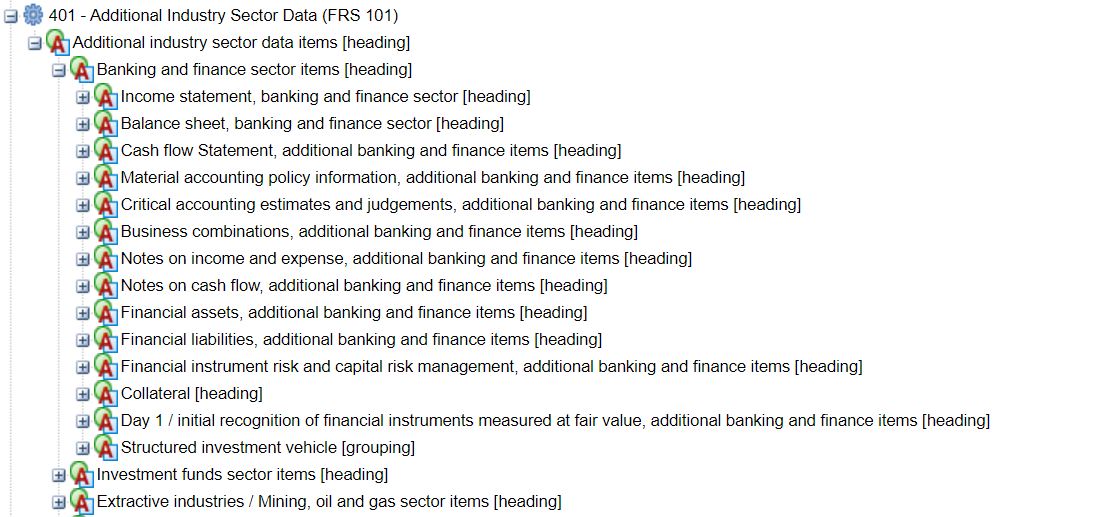 Figure
- Banking section of FRS 101 taxonomy.
Those creating reports for ordinary commercial and industrial companies MAY use tags from the industry sector sections where appropriate, but in general this is not expected to be required.
3.15 Changes from the previous UK accounts taxonomies
The FRC taxonomies have retained the features of the previous UK accounts taxonomies for UK IFRS and UK GAAP, unless there was a clear reason for change. Many design features and the general approach to content in the previous taxonomies have stood the test of time. Unnecessary change would have had an adverse effect on familiarity and efficiency and would have served to increase cost and risk.
Taxonomy content itself has been reviewed and revised in detail to meet the needs of changed regulations under IFRS Accounting Standards and FRS 101 and FRS 102.
Main features which have changed or evolved in the new taxonomies include:
- Introduction of analysis items and typed dimensions.
- Introduction of 'non-standard' dimensions tags.
- Use of typed dimensions to support groupings, instead of the 'tuple' mechanism, which has been dropped from the taxonomies.
- Reduction in the level of detail of text tagging, combined with reliance on the latest version of Inline XBRL, which permits a single text tag to be applied across different fragments of text.
- Introduction of more comprehensive guidance within the taxonomy, including guidance tags, cross-reference tags and documentation fields. This includes support for hyperlinking from cross-reference tags.
- Introduction of comprehensive accounting references.
- Dropping of the use of start / end period labels.
- Updating of new datatypes to identify particular items, such as heading items, guidance tags and groupings, and the adoption of new international datatypes where appropriate.
- The standardisation on the 'fixed value' mechanism to represent pre-defined values and the dropping of the 'enumerated values' mechanism. This use of fixed value type tags is explained in section 4.12.
- The creation of a separate dimensions section in the presentation linkbase, providing a comprehensive listing there of the content of dimensions.
- The introduction of credit / debit balance types for cash flows.
3.16 Taxonomy extensions
Preparers of XBRL reports are not expected to create their own Taxonomy extensions to define tags for entity-specific data not covered by the FRC taxonomies. The FRC taxonomies are intended to cover all current tagging requirements for filing of accounts information to public agencies.
If any entity does create a taxonomy extension, it must do so according to the strict rules set out below. The extension will otherwise:
- undermine the meaning of tagging based on the original taxonomy; and
- provide inconsistent or unclear tags which cannot be usefully analysed or compared.
3.16.1 RULE
Organisation-specific extensions taxonomies:
- MUST NOT be created UNLESS these are required to represent data which is: a. material to the business report concerned; AND b. not covered in the published FRC taxonomies.
- MUST NOT create tags which broadly duplicate the meaning of tags in the FRC taxonomies.
- MUST NOT change the definition of elements in the FRC taxonomies, for example by removing dimensional links or accounting references or altering basic attributes of tags.
- MUST follow the design and conventions adopted in the FRC taxonomies or described in FRC documents. This is to ensure any extension operates in a consistent way and produces tagged data which can be properly understood.
- MUST NOT be created for purely presentational purposes, such as amendment of taxonomy labels. Presentational requirements MUST be handled using Inline XBRL.
4. Principles of XBRL tagging
4.1 XBRL tagging – basic principles
In the simplest terms, the XBRL tagging of a report is achieved by matching a tag in a taxonomy to a data item in a financial statement. The data item concerned may consist of a monetary value, an ordinary number, a date, a section of text or some other standard type of data.
For example, if a financial statement contains the line item 'Operating profit £300,000′ then the value £300,000 should carry the XBRL tag whose label is 'Operating profit (loss)'. Note that the monetary tag is only applied to the financial value; the description of the line item in the human-readable accounts remains untagged and is handled purely as text.
Some textual data in reports has associated tags and should be tagged accordingly. This includes the text of specific declarations, policies and descriptions. Data which applies to different periods is not represented by different tags. The period is represented by the date context applied to an item. For example, the same tag is used for operating profit for 2025 as for
- Similarly, values at the beginning and end of periods are distinguished by date – not by tag.
Taxonomies do not contain tags to represent footnotes. These are handled through an XBRL footnote mechanism which allows preparers freely to attach footnotes to any data item.
The rest of this section provides guidance and rules on the tagging of reports. The following section, 5.0, provides guidance and rules on the entry of data values.
The rules stated below refer to 'tag' in the singular, but they must also be taken to mean combinations of tags, covering both the line item tag and associated dimension tags, where appropriate.
4.2 Choice of taxonomies
4.2.1 RULE
Users MUST tag data with the taxonomy which matches the standard under which the data is prepared. For example, companies reporting under FRS 102 must use the FRS 102 taxonomy.
Some consolidated reports may contain statements reported under different standards, for example group data reported under IFRS Accounting Standards and company data under FRS 101. Such reports may be linked to multiple taxonomies, with the group data tagged with the IFRS entry point and the company data tagged with the FRS 101 entry point.
4.3 Scope of tagging
4.3.1 RULE
All business data items in a report MUST be tagged with an appropriate XBRL tag IF a suitable tag exists in the relevant taxonomy.
The taxonomies are intended to support comprehensive tagging of the main statements and financial schedules in the accounts of companies in the industry sectors which they cover.
However, data should only be tagged if suitable tags are available. Tags may not exist for certain data which is specific to certain companies or sectors and / or is not suitable for comparison or analysis by software.
In particular, data in the Directors' and Auditors' Reports should only be tagged if specific tags exist for this data within the Directors' and Auditors' Report sections of the taxonomy. The only data in the Strategic Report which must be tagged is that for employees by gender, which is covered by tags in the Directors' Report section of the taxonomy. Other textual reports, if they exist, are NOT expected to be tagged.
For example, information on turnover or profit in the Directors' Report need not be tagged since it is assumed this data will be tagged in the financial section of the report. However, if data which is normally disclosed in the financial section of a report is not revealed there but is only present in the Directors' Report, then it must be tagged there. An example is directors' remuneration, if this is disclosed in the Directors' Report rather than in the main body of the accounts.
The Charities FRS 102 SORP taxonomy and Charities are intended to support comprehensive tagging of the main statements and financial schedules in the accounts of charities in the sectors which they cover.
However, data should only be tagged if suitable tags are available. Tags may not exist for certain data which is specific to certain charities or sectors and / or is not suitable for comparison or analysis by software.
4.4 Choice of tags
4.4.1 RULE
A data item MUST be matched against the closest available line item tag in the appropriate taxonomy, based on the tag's label, position in the presentation view, accounting reference, data type, period type and other taxonomy information PROVIDED that the use of the tag to represent the data item does not introduce a material distortion in the meaning of the business report. The closest appropriate dimension tags MUST also be applied in order accurately to reflect the meaning of a data item.
In general, the appropriate tag for a data item should be relatively obvious once the tag is located in the taxonomy. For example, an item in a FRS 102 income statement described by a company as 'Profit prior to tax' and appearing prior to the tax charge on ordinary activities can be matched against an element in that position in the FRS 102 taxonomy labelled 'Profit (loss) on ordinary activities before tax'. The label used for an item in a taxonomy may not exactly match the description used by a company.
The position of a tag in the presentation view of a taxonomy is a strong clue to meaning: for example, a tag listed in the taxonomy under 'Operating costs' is clearly an expense item and not an asset.
However, a tag's position in a presentation view will not necessarily match that of the corresponding item in a company's report. Companies vary significantly in where they choose to place items in their reports. The presentation view in the taxonomy provides guidance on meaning but it is NOT definitional. For example, tags from the primary statements section of an accounts taxonomy may be used for line items in the notes of a company report and vice versa. Companies may thus find suitable tags in locations which do not match the particular presentation of their accounts.
Companies may use differing terminology for the same accounting concept. Preparers of XBRL reports must not be distracted by terminology and should identify the real meaning of items and tag accordingly.
The basic rule on matching allows some latitude in the application of tags to line items in reports. It seeks a best available match. It recognises that the limited number of tags in a taxonomy cannot represent all the subtlety of meaning which a company may impart through the descriptions and details of formatting which it employs in its financial statements. The latter may be reproduced using Inline XBRL, while tagging is used to convey the general meaning of the item concerned.
Nevertheless, tags should not be 'stretched' in their meaning in order to tag a data item. This would undermine the consistency of tagging across companies.
It is the responsibility of the reporting organisation to make a reasonable judgement on the application of tags in its financial reports.
4.5 Significant numeric data
4.5.1 RULE
Significant numeric data presented within text in the financial section of a report MUST be tagged with the appropriate numeric tags for that data. It MUST NOT be hidden within a text tag or within an XBRL footnote.
This rule is intended to prevent numeric data being hidden from analysis software by tagging it as text or dropping it within a footnote. The choice between reporting numeric data as a line item or placing it in a footnote may not be important to a human reader, but it is important when data is encoded in XBRL. Note that this rule is not concerned about how data is displayed in a human-readable presentation – purely about how it is tagged.
Where appropriate tags exist for a section of text and numeric data within the text, then both the text and the numeric data MUST be tagged.
4.6 No tag available
4.6.1 RULE
IF no tag in the appropriate taxonomy provides a suitable match for a particular data item, the preparer of an XBRL report MUST report the item as untagged text in Inline XBRL.
4.7 Alternative tags
4.7.1 RULE
When alternative tags, of different levels of granularity, in a taxonomy both match a data item in a business report, preparers of XBRL reports MUST choose the tag which best represents the intended meaning and level of granularity of the data item. In doing so, they MUST abide by the following rules:
- If the data item is intended to represent a broad total, then the tag which represents such a total MUST be used. In particular, broad total tags SHOULD be used to represent data in primary statements of accounts.
- If the data item is intended to represent a detailed breakdown, then the tag which represents that level of breakdown MUST be used. In general, detailed or granular tags SHOULD be used to represent data presented in notes to the accounts.
Alternative tags with different degrees of generality will often be available to match an item in a business report. The positioning of the tags within a taxonomy – and thus the level of detail they are intended to represent – will indicate which should be used.
The aim of this rule is intended to ensure that tags for broad totals are not missing from an XBRL report, even if a company uses a detailed description for an item in a primary statement. It is also intended to ensure that detailed information in notes to the accounts is tagged to the appropriate level of detail.
4.8 Unique application of tags
4.8.1 RULE
The value assigned to each tag for a single context in an XBRL report MUST be unique. The same tag MUST NOT be assigned to different data values with the same context.
The context of an item means the period, entity and dimensions to which it applies.
This rule means that the same tag must not be used for different data in the same report. For example, if the 'Operating profit (loss)' tag is attached to a value of £1 million for the financial year 2025, it must not also be attached to a value £1.5 million for the same period and company.
The rule ensures the consistency of reports from the point of view of both accounting and tagging.
Clearly, the same tag may be reused for different time periods or if different dimension tags are applied.
4.9 Tagging of multiple occurrences of data items
4.9.1 RULE
If the same data item appears in different places in a financial section of a report then ALL occurrences of that data item MUST be tagged, even if different scaling applies to some occurrences. This rule ensures that data is consistently reported in XBRL and discrepancies between human readable and XBRL reports do not occur.
For example, the same accounting line item may appear both in a primary statement and in a note to the accounts. Both occurrences must be tagged.
This rule ensures that data in financial reports is filed consistently and enables a range of basic validity checks. It helps to ensure that different numbers for the same thing do not appear in different places within a report. It is important, among other things, for assurance on tagged accounts.
This rule concerns the financial section of accounts, not the Directors' and other textual reports which precede the financial section. The data which should be tagged in the textual reports is covered in section 4.3.
4.10 Tagging of multiple occurrences of data items
4.10.1 RULE
Data items SHOULD be matched against tags of the correct period type.
This is a special case of rule 4.4 on choice of tags. All XBRL tags carry an instant or duration period type. Income, expenses, and cash data are flows, measured over a period, while assets and liabilities are stocks, measured at an instant. Most text tags, including declarations, are treated as duration type in XBRL. The period type determines the date context applied to items in XBRL reports.
This rule aids accurate tagging as well as ensuring correct processing of data in XBRL reports. For example, if an income item or a movement in assets is being tagged with an instant period-type tag that is an indication that an incorrect tag may be being applied.
There is a qualification to this rule where a dimension tag is applied to an ‘instant' item in order to express a movement. This occurs with financial instrument tags which are attached to dimensions expressing various movements, such as movement in fair value. In these special and limited cases, the application of the dimension tag effectively transforms the nature of the tagging to express a change over time, although the line item concerned is a of instant type. For this reason, the rule is expressed as a 'SHOULD' rather than a 'MUST'. In other situations, however, the rule always applies.
4.11 Use of 'generic' tags
As explained in section 3.6.3, a number of dimensions contain 'generic members' to represent classes of information where the precise members of the class are not known in advance. For example, the entity officers dimension includes 'Director 1', 'Director 2' etc., while the subsidiaries dimension includes 'Subsidiary 1' 'Subsidiary 2' and so forth.
All dimensions containing generic tags are attached to a name or description tag so that the identity of a particular generic dimension member may be defined. For example, a 'Name of entity officer' tag is linked to the entity officers dimension and a 'Name of subsidiary' tag is linked to the subsidiaries dimension.
A full list of generic dimension tags, together with their associated name or description tags, is set out in Appendix A.
The following rules apply to the use of generic dimension tags.
4.11.1 RULE
When a generic dimension tag is used in an XBRL report the associated name or description tag MUST be used in combination with that tag to provide a human readable identification.
For example, generic dimension tags like Director 1, Director 2, Acquisition 1, Acquisition 2 must be identified using the appropriate name tag in combination with them.
4.11.2 RULE
Generic dimension tags MUST be used consistently within a report. Any data tagged with a particular generic dimension tag MUST relate uniquely to that single dimension tag.
For example, if Director 1 has been identified as Joe Bloggs, then the Director 1 dimension tag must be used consistently throughout a report to apply only to data related to Joe Bloggs. A single generic dimension tag must not be used to identify different things within a single report.
The number of generic tags defined in each dimension should be more than sufficient for most purposes. For example, the 'Entity officers' dimension allows up to 40 directors to be identified.
In the very rare cases where the number of generic dimension tags is insufficient, preparers may leave the data untagged, simply reporting it as text in Inline XBRL.
4.12 Use of 'fixed value' tags
A small number of tags in the taxonomies have a predefined fixed value of 'nil'. They have their effect simply by being included in an XBRL report in combination with an appropriate dimension tag. They do not contain any value in the XBRL report.
An example is 'Country of formation or incorporation'. To represent country of incorporation, this tag should be included in an XBRL report in combination with the appropriate dimension tag from the 'Countries and regions' dimension. This ensures unambiguous identification of the country concerned.
Another example is 'Director signing report' in the Directors' Report section. This tag should appear in combination with the dimension tag identifying the director concerned from the 'Entity officers' dimension. (The name of the director is defined separately by the 'Name of entity officer' tag used in combination with dimension tag for the director.)
All these fixed value tags are defined as being of 'fixed item type'.
4.13 Use of analysis items
As explained in section 3.8, analysis items are intended to enable the tagging of entries for which no specific tag exists. Each analysis item is specific to the section in which it appears and is defined as a component of the total monetary value for the section. An analysis item may be used multiple times in order to tag different line items, provided each occurrence carries a different value of the typed analysis dimension to which it is attached.
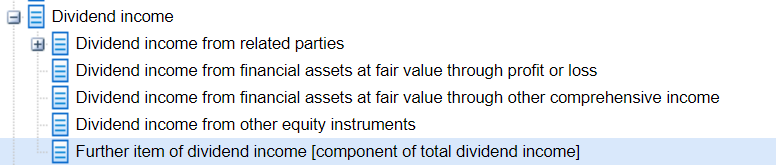
For example, figure 15 shows the dividend income section, which contains the analysis item 'Further item of dividend income [component of total dividend income]'.
 Figure
- Dividend income with analysis item
If a report includes two types of dividend income which are direct components of total dividend income and do not match available tags, then the two types of dividend income should be tagged with 'Further item of dividend income [component of total dividend income]', using a different integer value for the typed analysis dimension in each case.
The following rules apply to the use of analysis items:
4.13.1 RULE
Analysis items MUST only be used:
- When no other suitable line item tag (or combination of line item and dimension tags) is available for the data concerned.
- Within the section for which they are intended.
- For entries which are a direct component of the total to which the analysis item refers. Entries which are breakdowns of an intermediate sub-total and are thus not direct components of the total MUST NOT be tagged with an analysis item which points to the total.
In other respects, analysis items MUST be used in the same way as other line item tags. In particular, ordinary dimension tags MUST be used appropriately with analysis items, when the meaning of the data requires this.
These rules are intended to ensure that analysis items can be correctly interpreted by consumers and do not lead to double-counting if summation is checked.
Rule (c) above means that the tagging of an entry with an analysis item will depend on whether the entry is a direct component of a total or just a component of an intermediate sub-total. For example, a tag for 'Amounts recoverable on contracts' exists under debtors in FRS 101 and
- However, a report may include debtor entries for 'Amounts recoverable on construction contracts' and 'Amounts recoverable on consultancy contracts'. These have no directly equivalent tags. If they are shown in the report as direct components of debtors, i.e. without a parent total for amounts recoverable on contracts, then they must each be tagged with the analysis item 'Further item of debtors [component of total debtors]'. This will help ensure all direct components of debtors are tagged and the basic summation of debtors items can be checked.
However, if the two items are simply shown in a report as a breakdown of amounts recoverable on contracts, with the latter value present in the report, then the two items must not be tagged. They are already represented in the value of debtors through their parent total, which will be tagged.
Figure 16 illustrates this point.
| Total debtors | |
|---|---|
| Trade debtors | |
| Amounts recoverable on contracts | |
| Amounts recoverable on construction contracts | Must not be tagged |
| Amounts recoverable on consultancy contracts | Must not be tagged |
| Advances paid to suppliers | |
| Total debtors | |
| Trade debtors | |
| Amounts recoverable on construction contracts | Must be tagged with analysis item |
| Amounts recoverable on consultancy contracts | Must be tagged with analysis item |
| Advances paid to suppliers |
Figure
- Illustration of use of analysis items, in this case 'Further item of debtors [component of total debtors]'. Specific tags exist for the items shown in black but not the items in blue.
The rule on consistent use of dimension tags with analysis items is intended to ensure accurate and consistent tagging of all data.
For example, if a set of data is identified as for continuing operations, then all entries, including those tagged with analysis items, must be tagged with the continuing operations dimension tag.
In other words, the use of analysis items does not imply any loosening of rules on applying the closest available tagging.
Labels of analysis items generally identify the specific total of which the analysis item is a component. However, in cases where items have long labels, the wording '[component of corresponding total]' is used instead. The 'corresponding total' refers to the first part of the label. An example is the label: 'Further item of increase (decrease) in amortisation and impairment, intangible assets [component of corresponding total]'. In this case, the total concerned is 'Increase (decrease) in amortisation and impairment, intangible assets'.
In all cases, the corresponding total should be obvious, since it will be the direct parent of the analysis item in the presentation view.
The particular integer value from the analysis dimension which is used with an analysis item has no significance. It is not intended to transmit any meaning. Integers can be used in any sequence. The use of different integers is purely to distinguish different occurrences of an analysis item.
An analysis item must carry the same integer value if it is simply representing the same item across different periods. Similarly, duplicate entries of analysis items must carry the same integer value if they are appearing in matching tables or schedules. This ensures that duplicate entries, if they exist, can be accurately identified.
4.14 Non-standard dimension tags
As stated in section 3.6.4, a number of dimensions contain 'non-standard' or 'further item' dimension tags to handle breakdowns of classes of information which cannot be fully defined in advance.
An example is the PPE classes dimension, which includes four tags of the form 'Non-standard PPE class [component of total property, plant and equipment]'. Such tags differ from generic dimension tags in that they do not represent a general class of items and are not tied to a name or description tag.
The following rules apply to the use of these dimension tags:
4.14.1 RULE
'Non-standard' and 'further item' dimension tags MUST only be used:
- When no other suitable dimension tag is available for the class of information concerned.
- For classes of information which are a direct component of the relevant total. They MUST NOT be used to tag classes which are breakdowns of an intermediate sub-total and are thus not direct components of the total concerned.
In other respects, these dimension tags MUST be used in the same way as other dimension tags.
These rules are intended to ensure consistent use of the non-standard dimension tags and avoid double-counting if summation is checked.
The rules may mean that certain breakdowns of intermediate classes are not tagged. However, top-level classes should be tagged comprehensively, and their summation may be tested.
For example, the PPE classes dimension includes tags for 'Vehicles' and component classes such as 'Aircraft'. It does not include 'Large aircraft' and 'Small aircraft'. It a report includes the "Large aircraft' and 'Small aircraft' classes, these must be tagged with the non-standard PPE dimension tags if they are shown in the report as direct components of the PPE classes total. However, if they are shown as components of an intermediate sub-total, such as ‘Vehicles', then they must not be tagged. This will avoid double-counting.
The total to which a non-standard dimension tag refers is either shown specifically by its label or is the total for the dimension.
If a report contains a greater number of untypical classes than can be covered by non-standard tags, then some classes will have to be left untagged.
4.14.2 RULE
If a report contains a greater number of untypical classes than can be covered by available non-standard tags, then the most significant of the untypical classes, either by monetary value or other appropriate measure of materiality, SHOULD be tagged in preference to less important classes.
4.15 Use of tags for 'Other...' data
A number of tags represent a residual amount from a list of items. An example is 'Other creditors'. These are intended for tagging items which are described as 'other' in a financial report.
4.15.1 RULE
Tags labelled as representing 'other' amounts SHOULD be used to tag entries identified as 'other' or 'residual' in a financial report. If they exist in a section which also contains an analysis item, they MUST NOT be used to tag entries unless these are specifically identified as 'other' or as a residual amount. If they are in a section which does not include an analysis item, they MAY be used to tag a specific entry, if no 'other' entry exists in that section of the report. These cases will be rare since most sections that contain an 'other' tag also include an analysis item tag.
The purpose of this rule is to avoid confusion between the role of analysis items and tags for 'other' amounts.
4.16 Use of grouping tags
As explained in section 3.7, tags in a grouping are used for closely related items of information, such as a description of a particular item and its monetary value.
Tags in a grouping are all attached to a typed dimension that is specific to that grouping. When used, each tag must be assigned a particular integer value of the typed dimension.
4.16.1 RULE
Tags in a grouping that are applied to a particular set of information MUST all be linked to the same typed dimension tag value. The same set of information in a different time period MUST also carry the same typed dimension tag value. Different sets of information MUST be distinguished by a different typed dimension tag value.
This rule ensures that related information is correctly tied together.
For example, when using the bank loan grouping, which ties together the description of loan and its amount, preparers must assign the same typed dimension tag value to the description and amount of a particular loan, both in the current and previous period. A different loan would be identified by a different typed dimension tag value.
The particular integer value of the typed dimension that is used has no significance – the value is purely to identify the data items which match together.
Normal tagging rules apply to all items tagged with grouping tags. Ordinary dimension tags must be applied to them, as required.
4.17 Tagging of text
As stated in section 3.13, a range of tags of 'string' data type are available for tagging of text. Dimension tags may be used with text tags in the same way as numeric tags. For example, the policy on a particular class of PPE may be identified by combining the 'Property, plant and equipment policy' tag with the appropriate dimension tag for that class.
Text of any format or length, including text containing numbers or similar data, may be tagged with a text or 'string' tag. However, as stated in rule 4.5 above, significant numeric data must not be hidden within a text tag. Both the numeric data within the text and the text itself should be tagged with appropriate tags.
Text tags allow 'nesting' so that tagged data may be included within other information tagged with a text tag. For example, a name, number or date within a block of text may be tagged, while the whole block of information is also tagged with a description tag.
The scope of text covered by a text tag is governed by the following rule:
4.17.1 RULE
Text tags MUST be applied to the full content of the textual data which they represent. They MUST NOT be applied to just a portion of the data. This is intended to ensure that all relevant data is captured by a tag.
The latest version of Inline XBRL allows different fragments or sections of text to be concatenated together under a single tag. Text which is spread over different pages or is divided before and after a financial table may thus be covered by a single tag.
Software supporting the FRC taxonomies is expected to use the latest version of Inline XBRL.
4.18 Use of 'free-text comment' tags
4.18.1 RULE
Free-text comment tags MUST only be used to cover supplementary comment in the specific area to which they apply. They MUST NOT substitute for specific tags where the latter would be appropriate.
For example, free-text comment tags should be used to tag the general explanation which might appear at the bottom of a note to the accounts, for which no other suitable tag exists.
4.19 Tagging of footnotes
Footnotes to particular data items MAY be attached to the item using the XBRL footnote mechanism. Taxonomies do not define special tags for footnotes. If significant numeric information is contained within a footnote, this data must be tagged in the ordinary way, in line with Rule 4.5.
The availability and use of the XBRL footnote mechanism is dependent on the software used for preparing reports in iXBRL. If relevant footnotes are not attached to data items using the XBRL footnote mechanism, anyone analysing raw XBRL data will not be aware that an explanatory footnote is available.
Free-text comment tags are intended to reflect general subsidiary comment on a statement or note, not footnotes on particular data items. In some cases they may be suitable for tagging footnotes, but they will not provide a general solution.
4.20 Tagging of comparative data
4.20.1 RULE
Comparative data for preceding periods in financial reports MUST be tagged, just as data for the most recent period is tagged. This rule includes previous period data for which no current data is published.
4.21 Compulsory tags
4.21.1 RULE
The following tags MUST be used in XBRL versions of accounts to aid identification of the report and processing of information:
- Entity current legal or registered name
- Start date for period covered by report
- End date for period covered by report
- Balance Sheet Date
- Date Authorisation Financial Statements For Issue
- Director Signing Financial Statements
- Entity Dormant True/False
- Entity Trading Status
- Accounting Standards Applied
- Accounts Status Audited or Unaudited
- Average Number of Employees During the Period (periods starting on or after 1/1/16)
HMRC, Companies House and other receiving organisations will set additional requirements on compulsory tags and other aspects of filing. They will publish such rules and requirements in their own documents. HMRC information is available on GOV.UK.
4.22 Unreported data
4.22.1 RULE
Data which is listed in a financial statement but is not reported, such as data represented by a dash or a blank in a table, SHOULD NOT be tagged.
Data values which are represented by dashes or similar indicators of unavailability should be treated as not reported. They should thus be left untagged. (Tagging of such data will require it to be assigned a value, such as zero. This will generally not be the meaning a preparer wishes to convey.)
4.23 'Not applicable' tag
A special tag, 'Not applicable [default]', is defined as the default dimension member in a number of dimensions.
This tag causes the dimension concerned to be ignored, except when a preparer actively uses a tag from the dimension. It simplifies the design of dimensions and the work of tagging. Like other defaults, the 'not applicable' tag itself is not used in tagging and must not be applied by preparers of iXBRL reports.
4.24 Nesting of tags
As stated in section 4.17 on tagging of text, other tags may be 'nested' within data tagged with a text tag. Numeric, boolean and other types of line item tag may all be applied within a block of text which has been tagged with a text tag.
Numeric tags may also be nested together under strict conditions. The numeric tags must be applied directly around one another, without intervening text. Effectively, this allows the same piece of data to be tagged with a series of numeric tags.
This will only be valid if the data is in the correct format for the different numeric tags concerned – for example in a number format if a 'decimal item type' tag is used.
This nesting is useful if a single number or monetary item represents more than one piece of information – for example if a report uses a single figure for both current and previous periods or for the percentage ownership of a number of different subsidiaries. Multiple numeric tags identifying the different meanings may be applied to the single data item.
4.25 Distinction of company and group data
The dimension tags 'Consolidated' and 'Company [default]' exist to distinguish group and company data. Their use will normally be straightforward, with company being the default.
In some cases, however, an organisation may present some data in its accounts as applying to both group and company. For example, such combined accounts may show separate balance sheets for the group and the company, but a single table for property, plant and equipment, with the same PPE values applying to both group and company. The general rule for handling such cases in Inline XBRL is:
4.25.1 RULE
When group and company data in a financial report is being tagged, a data item which represents a value for both the company and the group MUST be tagged twice: once using the appropriate 'Consolidated 'dimensional tag to identify the data as relating to the group and once without a group / company dimension tag, indicating that it relates to the 'Company [default]. Other tags attached to the data item will be identical.
This double tagging of information MAY be achieved by nesting of the tags applied to the data. It is not necessary physically to duplicate the data in the iXBRL report.
The nesting of taxonomy tags is described in section 4.24 above.
4.26 Revised data
The dimension tags 'Superseded' and 'Currently stated [default]' exist to distinguish original and revised (amended) data. Revision can take two forms: by amendment and by supplementary note.
Under normal circumstances, with no specific amendments to report, the default applies (i.e. everything is regarded as “revised” with respect to the previous version, if any, of the report), but where revisions (amendments) are being tagged (i.e. revision by amendment) the specific data items that represent the original values should be tagged with the 'Superseded' dimensional tag in addition to the data items that represent the revised data being tagged with the default. If, however, the revision is by supplementary note then the Superseded dimensional tag should not be used.
'Currently stated' is the default so that validation and/or data analysis rules can be applied to a mixture of original and revised data without having to make special provision for any dimension membership difference. The presence of corresponding data items tagged with the 'Superseded' member is intended to act as an indication that these specific data items have been revised/amended.
The distinction between the two forms of revision is defined by the tags used in the Revised accounts statements section of 003 - Report Information.
5. Entry of data values
5.1 Entry of data entry - introduction
This section describes some key aspects of the entry of data values in XBRL reports. It sets out a number of rules and conventions.
As far as possible, software is expected to implement these rules and guidance, helping preparers to achieve correct data entry with a minimum of effort. The XBRL and Inline XBRL specifications provide further technical information on data entry.
5.2 Entry of numeric data – basic principles
Numbers in accounts may be presented in a variety of formats, but they must be entered as XBRL values in a consistent way. Inline XBRL enables underlying XBRL values to be transformed into alternative presentation formats which as suitable for human readers. For example, an underlying XBRL value of 3500 may be presented to the reader as 3,500, 35 hundred or 3.5 thousand.
A number which appears in the human-readable view of an Inline XBRL report is thus not necessarily identical in format to the underlying XBRL value – but it must have the same meaning.
The underlying value in XBRL must follow rules on XBRL data entry. XBRL requires numbers to be entered in a format 'nXd' where n represents an indeterminate set of figures before the decimal point, X represents a decimal point, if required, and d represents any figures after a decimal point. Examples of valid numbers entered in an XBRL report include ‘56831244', '8162' and '4.5'. A XBRL decimals attribute determines the number of decimal places to which a particular figure is accurate.
The preparer is free to choose the format of presentation of numbers in the human-readable accounts. Scale factors and transformation rules in Inline XBRL enable the transformation of an XBRL value into a format aimed at a human reader, so that 3500 may be presented as 3.5 thousand. Software should give preparers of XBRL reports a simple means of controlling numbers and their presentation without them having to understand underlying XBRL rules and terminology.
The currency used for ordinary monetary values is determined by the currency defined in the unit reference (unitRef) attached to each value. Again, software should give preparers easy ways of controlling the currency of monetary values.
The 'Currencies' dimensions defined in the accounts taxonomies are NOT used for assigning currencies to monetary values. One version of the currencies dimension is used for identifying the currencies used in the business report. It is attached to the fixed-value tag 'Principal currency used in business report'. Another version of the currencies dimension is used to identify the currencies in which particular financial instruments are denominated.
Particular data types are used for certain types of numeric data. For example, a 'Shares' type is used for tags representing numbers of shares. The full set of data types is listed in section 3.5. The use of some of these is discussed below. These data types help to ensure correct tagging and data entry and also support validation of XBRL reports.
5.3 Positive and negative values
The correct positive and negative sign MUST be applied to data values in an XBRL report. This sign is determined by XBRL rules based on the taxonomy. It is NOT necessarily the same as the sign which is used in the human-readable view of a report. The latter is controlled by the preparer and will depend on the particular conventions used in a report. Signs are transformed between the underlying XBRL data value and the human-readable presentation using features of Inline XBRL.
5.3.1 RULE
Preparers of XBRL reports MUST follow the sign rules below when entering XBRL data values:
- Data MUST always be entered as positive UNLESS rule (b) below requires otherwise.
- Where data may be positive or negative, the label will indicate the correct sign of the item. Labels will generally use brackets around terms to show what data should be entered as negative. If no brackets are present, data MUST be entered as positive UNLESS the value is the OPPOSITE of that indicated in a tag label.
Such reversals of sign MUST ONLY be used with concepts which may genuinely represent positive or negative values. They MUST NOT be used to transform the meanings of concepts – for example transforming an assets tag into a liabilities tag and vice versa. Different concepts MUST be represented by different tags.
Examples of sign indicators in labels are:
- Operating profit (loss)
- Net current assets (liabilities)
- Net cash inflow (outflow) from disposal
If a company reports an operating profit, it will thus enter the value of the profit as positive. On the other hand, if it reports a loss, it will enter the value of the loss as negative.
An example of a tag which does not include a bracketed term, but may in rare cases require a value to be entered as negative is 'Cost of sales'. In such cases, a large credit may mean that cost of sales effectively represents a net credit.
As stated in section 3.12, the taxonomies also allocate debit / credit balance indicators to monetary tags. These are intended to support calculations in software. They may help guide users on the correct sign but they do not apply to all numeric data and the wording of labels always takes precedence in determining sign.
5.4 Accuracy of values
5.4.1 RULE
The decimals attribute MUST be used in XBRL reports to indicate the accuracy of numeric values. The precision attribute MUST NOT be used
The XBRL specification allows two alternative methods of determining accuracy, decimals and precision. For simplicity and to avoid certain difficulties which can arise with the use of precision, the use of decimals is mandated for XBRL reporting in the UK. The decimals attribute, which determines the number of decimal places to which a particular figure is accurate, is vital to determining the true, underlying value of numbers in XBRL. For example, the numbers 12.34 and 12.00 at decimals 0 have an identical value of
- The zero decimals attribute means that all numbers after the decimal point are insignificant / unreliable and should be ignored. Similarly, 12.343 and 12.341 at decimals 2 have the same value, but at decimals 3 do not.
5.5 Period Context
The dates which apply to a data item in an XBRL report are determined by the period context. This is quoted in terms of the date of a day (yyyy-mm-dd) and may apply either to an instant (yyyy-mm-dd) or to a duration (from yyyy-mm-dd to yyyy-mm-dd).
5.5.1 RULE
The assignment of period contexts to values in an XBRL report MUST be consistent with both the period covered by the report and the data concerned. Period contexts will thus align with reporting periods. For example, 'Operating profit (loss)' over a financial year ending on 31 March 2025 will have a period context reflecting the duration from 1 April 2024 to 31 March
- 'Net assets (liabilities)' at the end of the period will have a period context of the instant 31 March 2025. All taxonomy concepts carry a period type attribute indicating whether they are measured at an instant or duration.
Dates of specific events must have contexts reflecting the period covered by the report – they do NOT take contexts matching the specific date they contain. For example, a date of revaluation of property, plant and equipment, which is of instant type, must have a context reflecting the end of the reporting period (the balance sheet date) – not a context which matches the date of the valuation. Similarly, the date of signing of the balance sheet should also have a context reflecting the balance sheet date – not the date of signing, which may be somewhat after period covered by the report.
This approach avoids preparers having to create a multiplicity of contexts to reflect different events.
The start period of a duration is defined by convention as midnight at the start of a day. The end period of a duration and the instant date is defined by convention as midnight at the end of a day. An important consequence of this is that an instant date for beginning of period is actually midnight on the previous day. In other words, the instant date for the period beginning 1 Jan 2025 is actually 31 Dec
- (An instant date of 1 Jan 2025 means midnight on that day, 24 hours into the period.) Note that this reasoning applies to instant contexts, not durations.
This has important consequences for the way context dates are assigned to movement analyses and similar data. A movement analysis covering two contiguous periods requires five context dates, not seven. An example is shown below.
- Value at end of previous year, 31 Dec 2023 (instant context 2023-12-31)
- Value at start of year, 1 Jan 2024 (also instant context 2023-12-31)
- Change during the year from 1 Jan 2024 to 31 Dec 2024 (duration context 2024-01-01 to 2024-12-31)
- Value at end of year, 31 Dec 2024 (instant context 2024-12-31)
- Value at start of year, 1 Jan 2025 (also instant context 2024-12-31)
- Change during the year from 1 Jan 2025 to 31 Dec 2025 (duration context 2025-01-01 to 2025-12-31)
- Value at end of year, 31 Dec 2025 (instant context 2025-12-31)
Note that the contexts for lines 1 and 2 and for 4 and 5 are identical. Clearly, the values and contexts for data at the end of period and the beginning of a consecutive one must be identical.
This may not be intuitively obvious to preparers looking at dates in a human-readable version of accounts. Software must help preparers to assign dates correctly and easily. Ideally, it should hide underlying XBRL reasoning on dates from users.
Clearly, restatements may alter a value at the start of a period, but that is handled through a separate mechanism from dates. Restatements are distinguished through the 'Restatements' dimension.
5.6 Range of values
Some information may be reported as a range between a high and low value, rather than as a single number. This particularly applies to the useful life of assets in information on depreciation.
A 'range' dimension, shown in Figure 17, enables the high and low value of a range to be tagged. The default for the dimension is 'single value'. This applies automatically unless the dimension tag for either the high or low value is selected.
![Software UI tree view showing 'Range [Dimension]' expanded to include 'Single value [default]', 'Top of range value', and 'Bottom of range value' options.](https://media.frc.org.uk/images/page_25_img_0_qUd1gJL.original.png) Figure
Figure
- Range dimension.
In the current taxonomies, the range dimension is only attached to tags for the useful life of assets. It may be used more widely in future taxonomy versions. If other data is reported as a range rather than as a single value, this cannot at present be tagged with numeric tags. (It can be covered by a text string tag, if an appropriate one is available.)
5.7 Dates
Tags of date type require XBRL values in the format yyyy-mm-dd. Conversion into other formats for human-readable presentation can be achieved through Inline XBRL transformation rules.
Dates which are not reported at this level of precision are represented in the taxonomy by text / string type tags. This enables the entry of date ranges or dates by month or year. Software should enable preparers easily to enter dates in a correct format.
5.8 Percentages
Percentages are represented by Percent type tags.
XBRL requires that percentages MUST be entered as XBRL values using decimal notation, so that 60% is represented in XBRL as 0.6. Inline XBRL enables this to be converted into a normal presentation in human-readable accounts. Software should enable preparers to enter percentages in a simple and efficient manner, without preparers having to be aware of XBRL rules on formatting of percentages.
5.9 Entity context
A number of tags are of boolean type, requiring TRUE / FALSE data entry. Some of these represent company declarations such as 'Entity is dormant [true/false]'.
5.9.1 RULE
Preparers MUST ensure that boolean tags representing company declarations are correctly entered with the right value in XBRL reports since these will be treated as formal declarations by the company. These MUST be consistent with textual statements in the human-readable version of a report.
The labels of all boolean tags end with ‘[true/false]'.
A number of boolean tags, including those representing a claim of exemption by an entity, need only be included in an iXBRL report if the 'TRUE' status applied. They MAY be omitted if this status does not apply (i.e. if they were to take a 'FALSE' value). This is to save tagging effort and to reflect the fact that such statements may only appear in accounts when the status applies. The documentation field indicates the tags which may be omitted if 'false' applies. (It is not an error to include such tags, provided they are given the correct value.) Other boolean tags MUST be included whether they take a true or false value.
5.10 Use of XBRL nil values
In general, if no value is being reported for an item, it is not expected to be tagged, as stated in section 4.22.
If preparers wish to tag a line item in a report for which no value is reported (as opposed to a value of zero), they may include the appropriate tag with an XBRL 'nil value'. The latter means null or not reported – it does not mean zero.
If preparers wish to explain why a particular item is not reported, they may do so by giving it a nil value and attaching a footnote explaining the reason using the XBRL footnote mechanism. Without explanation, the meaning of the nil value will not be clear. It may cover a host of meanings, including data not available, not known or confidential. The inclusion of tags with nil values and no explanation may prompt queries from receivers and consumers of XBRL reports.
5.11 Entity context
The entity context in an XBRL report represents the entity or company to which the data applies. It consists of two components:
- a URL of the identification scheme which defines the entity; and
- the code used for the entity within that scheme.
All companies that have a Companies House registered number are required to use this as the base for their entity context identifier and all charities are required to use their registration numbers.
5.11.1 RULE
All companies which have a Companies House registered number MUST use the identifier scheme http://www.companieshouse.gov.uk/ as their entity identifier scheme in XBRL reports. They MUST use their Companies House registered number as their entity identifier in context.
An organisation which does not have a Companies House registered number MUST use an identifier scheme defining the main authority which regulates the entity. It MUST use the public reference number allocated to it by that authority as its entity identifier in context.
5.12 Naming conventions in XBRL reports
Preparers and software providers should follow the conventions below in creating XBRL reports. These should be set by software rather than manually by preparers.
- Context names: The names (IDs) of contexts SHOULD follow a logical pattern which can be read by humans. For example, FY2025 may be a convenient ID for a context representing the financial year duration. Beyond this, no conventions for the naming of context IDs are being set. These may be application or report dependent. The requirement for a logical pattern is purely to enable human checking of underlying files, should this be necessary.
- Filenames of Inline XBRL reports: The filename of accounts and tax computation submissions SHOULD follow the pattern: name-of-organisation-yyyy-mm-dd-doctype.html
Where:
- 'name-of-organisation' is an appropriate name to identify the organisation (not necessarily its full official name).
- 'yyyy-mm-dd' is the date of production of the report.
- 'doctype' is an appropriate description of the type of report. For example, it may be used to distinguish between accounts and tax computations.
6. Taxonomy information
6.1 Taxonomy availability
The FRC taxonomies are available for download as a zip file from the FRC website at https://xbrl.frc.org.uk/.
Their main content can be viewed over the internet at https://uk-taxonomies-tdp.corefiling.com/yeti.
The taxonomy files are also published on FRC website pages which match the locations declared within the files themselves. Software developers may use these pages as authoritative references for taxonomy content.
Taxonomies should be viewed and used in appropriate XBRL software. Taxonomies consist of a range of different files which contain a variety of internal links. Spreadsheet or similar text files are not able to represent taxonomy content and features clearly and effectively. Such files are not being published for the FRC taxonomies.
6.2 Key information
Key information documents published with each taxonomy on the FRC website provide a range of basic information including:
- Name of owner, version date and number.
- Copyright, warranty and related legal information.
- Entry point for the taxonomy (the file through which a taxonomy should be opened in XBRL software).
- Schema location and reference: the identifier for the taxonomy which should be used by XBRL reports based on the taxonomy.
The key information documents are included in the zip file containing the taxonomies.
All users or prospective users MUST consult these documents and note the legal statements before using the taxonomies.
Other documents published on the FRC website at https://xbrl.frc.org.uk/ provide guidance to users and developers as well as showing examples of tagging using the taxonomies.
HMRC, Companies House, Irish Revenue Commissioners and other receivers of filings using the taxonomies will publish other information on their general and technical filing requirements, including dates for adoption. As stated in the Introduction, this tagging guide is purely concerned with accurate conversion of accounts into XBRL.
6.3 Updating of taxonomies
Taxonomies are expected to be updated annually to reflect changes in standards and experience with use. The FRC develops and maintains UK and Ireland accounting standards and makes amendments to its FRSs when necessary. FRS 101 is reviewed every year, a comprehensive periodic review of all FRSs takes place periodically, and ad-hoc amendments may be made at other times. UK Endorsement Board endorses the adoption of new or amended IFRS Accounting Standards issued by the IASB for use by UK companies. Taxonomy content will remain stable unless requirements dictate otherwise and plans for updating will be announced well in advance. Taxonomy review is likely to settle into a predictable cycle in line with standards review.
New taxonomy versions will normally be published as drafts for public comment a number of weeks before being finalised. Updated taxonomies are expected to be accompanied by versioning reports detailing changes made.
6.4 Taxonomy structure
A single taxonomy consists of a number of files, containing links to each other. The main taxonomy file, containing the basic list of tags, is known as a schema file and has an .xsd filename extension. Other files, known as linkbases, contain lists of labels, the presentation view, references, dimensional definitions and other information. They have .xml extensions.
Users should open a taxonomy in appropriate software through the main taxonomy entry file, which is listed in the taxonomy key information document. An entry file, which is always a schema .xsd file, will automatically import the relevant taxonomy file set.
Taxonomies may contain a number of smaller component taxonomies.
This is the case with the FRC taxonomies. As explained in section 2 on the taxonomies, they contain a common core schema which defines the XBRL elements and key features of the design. This reflects the fact the entry points IFRS, FRS-101 and FRS-102 share a range of common accounting concepts.
Each individual taxonomy (except for the standalone UKSEF 2021/2022 taxonomy) extends the core schema so that it presents the range of XBRL elements which is appropriate for the standard concerned.
The taxonomies also contain a number of common components to handle standard entity and business data, the Directors' Report, Audit Report, an accountant's report and a detailed profit & loss statement. The fact that these components are shared by the taxonomies means that tagging of this information should be consistent and comparable, whichever accounting standard is being followed.
The standard entity and business data is covered by the 'Common Data' taxonomy, which covers the taxonomy sections ‘002 - Entity information', '003 - Report information' and '016 - Accountant's Report', as well as defining the basic dimensions representing countries, currencies and languages.
The Directors' Report and Audit Report taxonomies cover the taxonomy sections '010 - Directors' Report' and '15 - Audit Report' as well as defining the directors' remuneration and audit fees content which is used within the notes to the accounts sections of the Full IFRS, FRS 101 and FRS 102 entry points.
While the definition and organisation of such components is important to the efficient creation of taxonomies and the comparability of tagged data, preparers of XBRL reports can generally ignore the fact that separate modules exist and consider each taxonomy as a single set of tags.
Figure 18 shows the main components of the FRC taxonomies. It is illustrative and does not show all technical components, files and links.
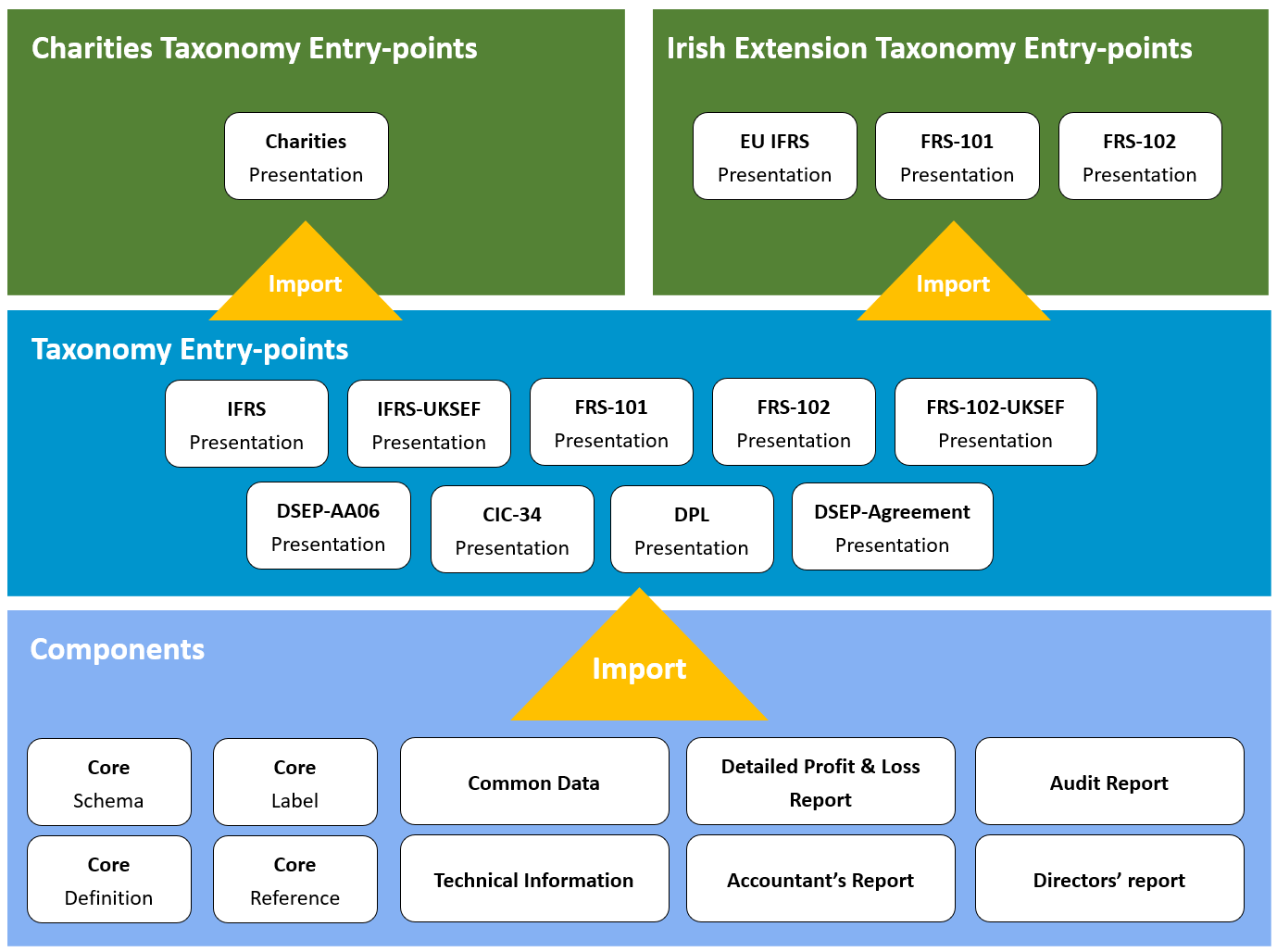
6.5 Further technical information
This guide is aimed at those preparing or analysing reports in XBRL, rather than software developers or others who require detailed technical information on the taxonomies.
Those who require further technical information should see the Developers Guide published on the FRC website at https://xbrl.frc.org.uk/. For general technical information, they should also consult the XBRL International website at http://www.xbrl.org/ and in particular the specification documents listed below:
- Core XBRL 2.1 specification [SPEC].
- XBRL Dimensions specification [DIMS].
- Inline XBRL specification [XBRL].
These specifications are listed in the References appendix.
6.6 Taxonomy versioning
In principle only two versions of the taxonomies should be in use by preparers and developers: the latest version and the penultimate version. This is to ensure that preparers comply with the full tagging requirement from HMRC. Versions of the full suite of FRC taxonomies for 2026 were released on 18 November
- All reporters may elect to use this 2026 taxonomy suite.
The previous version of the full suite of FRC taxonomies for 2025 was released on 18 October 2024.
The 2024, 2023, 2022, 2021, 2019 and 2014 versions of the taxonomies should only be used prior to 1 January 2025; they should not be used to report with post that date, because full, up-to-date tagging using these versions will not be possible. HMRC are seeking views on shutting down the use of this version and the ability to report to HMRC using products based on these versions. For further information on what suite of taxonomies to use please refer to the FRC website.
7. Deprecation Policy
When it is necessary to remove some part of a UK Taxonomy, the following process will be followed:
7.1 Deprecation Timeline
The Deprecation Timeline is the period between announcing that a tag is deprecated to fully removing it from the taxonomy altogether.
- Deprecated tags will be available for one taxonomy version before being removed (i.e. a tag marked as “deprecated” in the 2024 taxonomy will not be available in the 2025 taxonomy).
- Where the standard or regulation requires deprecated tags to be available for longer than a year, tags will be deprecated when no longer relevant, or the standard or regulation permits removal.
- Historical taxonomies are available on the FRC Taxonomies webpage for those who have a legitimate need for them, or for reference.
7.2 Informing users
- Information relating to deprecations will be available on the FRC Taxonomies webpage.
- Deprecations are clearly marked in the mapping file for each taxonomy. Mapping files show the changes from the current taxonomy year version to the previous taxonomy year version and will be available on the FRC Taxonomies webpage.
- Deprecations are included in the Guidance document produced for each version of taxonomy. These will be available on the FRC Taxonomies webpage.
7.3 Changes to the taxonomy
- Where relevant, a 'deprecated' label is added to the tag to advise taxonomy users on appropriate usage and/or alternative tag(s).
- The label of a deprecated tag will be updated to include the word 'deprecated' and the date of deprecation.
Appendices
A: Generic dimension tags
The table below shows generic dimension tags in the current taxonomies and their associated name or description tag.
| Dimension | Generic dimension tags | Taxonomies | Related name or description tag |
|---|---|---|---|
| Continuing and discontinued operations | Specific discontinued operation 1 to 8 | All | Description of discontinued operation or non-current assets or disposal group held for sale |
| Specific non-current assets / disposal group held for sale 1 to 8 | All | ||
| Chairman | |||
| Chief executive | |||
| Chairman and chief executive | All | ||
| Senior partner, limited liability partnership | |||
| Company secretary 1 to 2 | All | ||
| Entity officers | Company secretary and director 1 to 2 | All | Name of entity officer |
| Director 1 to 40 | All | ||
| Partner, LLP, 1 to 20 | All | ||
| Trustee 1 to 20 | Char | ||
| Corporate trustee 1 to 3 | Char | ||
| Director 1 of corporate trustee to 3 | Char | ||
| Custodian trustee 1 to 3 | Char | ||
| Operating segments | Reportable operating segment 1 to 20 | All | Name of individual segment |
| Products and services | Product and service 1 to 12 | All | Name of individual segment |
| Major customers | Major customer 1 to 12 | All | Name of individual segment |
| Business combinations | Specific business combination 1 to 10 | All | Name of acquired entity |
| Biological asset classes | Consumable biological asset class 1 to 5 | All | Name or description of biological asset class |
| Bearer biological asset class 1 to 5 | All | ||
| Subsidiaries | Subsidiary 1 to 200 | All | Name of subsidiary |
| Associates | Associate 1 to 50 | All | Name of associate |
| Joint ventures | Joint venture 1 to 50 | All | Name of joint venture |
| Unconsolidated structured entities | Unconsolidated structured entity 1 to 5 | All | Name of unconsolidated structured entity |
| Intermediate parent 1 to 5 | All | ||
| Entity with joint control or significant influence 1 to 5 | All | ||
| Another group member 1 to 8 | All | ||
| Trustee / trustees 1 to 5 | Char | Name or description of related party [if not defined by another tag] | |
| Related parties | Close family member of trustee / trustees 1 to 5 | Char | |
| Entity controlled by trustees 1 to 5 | Char | ||
| Key management individual / group 1 to 5 | All | ||
| Close family member 1 to 5 | All | ||
| Entity controlled by key management personnel 1 to 5 | All | ||
| Other related party relationship type 1 to 2 [component of total related parties] | All | ||
| Entity share classes | Ordinary share class 1 to 5 | All | Description of share type |
| Preference share class 1 to 5 | All | ||
| Deferred share class 1 to 5 | All | ||
| Other share class 1 to 5 | All | ||
| Share-based payment arrangements | Share-based arrangement 1 to 8 | All | Name of share-based payment arrangement |
| Share-based payment grants | Grant 1 to 10 | All | Name or description of grant under share-based payment arrangement |
| Post-employment benefit plans | Pension plan 1 to 6 | All | Name of defined contribution plan |
| Post-employment medical plan 1 to 2 | All | ||
| Other post-employment benefit plan 1 to 2 | All | Name of defined benefit plan | |
| Activity | Activity 1 to 50 | Char | Description of activity |
| Material funds | Material fund 1 to 50 | Char | Description of material fund |
| Linked charity | Linked charity 1 to 5 | Char | Description of activities of linked charity |
| Institutional Grant Recipient | Name of grant recipient 1 to 50 | Char | Name of specific institutional grant recipient |
| Concessionary loans | Concessionary loan 1 to 50 | Char | Description of concessionary loan |
| Contract Type | Other contract type 1 to 2 | All | Description of other contract type |
| Contract Duration | Other duration type 1 to 2 | All | Description of other contract duration type |
| Sales Channel | Other channel type 1 to 2 | All | Description of other sales channel type |
Updates to the UK Taxonomy Suite to cover particular industry sectors may introduce additional generic dimension tags.
B: Glossary
| Term | Definition |
|---|---|
| Analysis items | Analysis items are line item tags which are designed for use with entries in accounts for which no specific tag exists. Each analysis item tag is specific to the section in which it appears and may be reused multiple times to tag different entries. See section 3.8 for more information. |
| Charities SORP | Statements of Recommended Practice (SORPs). SORPs are sector-driven recommendations on financial reporting, auditing practices and actuarial practices for specialised industries, sectors or areas of work, or which supplement FRC standards and other legal and regulatory requirements in the light of special factors prevailing or transactions undertaken in that particular industry, sector or area of work that are not addressed in FRC standards. The Charities SORP provides guidance to preparers of charity accounts. The SORP provides recommendations and requirements setting out how to prepare 'true and fair' accounts in accordance with UK accounting standards. |
| Context | The XBRL context applied to a data item represents the time period and the entity to which the data applies. (Technically, dimension tags are also represented by contexts.) |
| Data types | Taxonomy tags are assigned a 'data type' to identify their meaning and role and to assist in processing XBRL data. See section 3.5.d for more information. |
| Dimensions and dimension tags | Taxonomy dimensions represent the different forms in which financial data may be reported. A dimension tag is used to represent each individual form of reporting. See section 3.6 for a fuller explanation. |
| Extension taxonomy | An extension taxonomy modifies another taxonomy by adding tags, providing alternative presentation views or other changes. The filing of XBRL reports in the UK is not expected to require entity-specific extension taxonomies. See section 3.16 for more information. |
| Financial Reporting Council | The Financial Reporting Council (FRC) is the UK's independent regulator which sets standards for corporate reporting, audit and actuarial practice and which monitors and enforces accounting and auditing standards. |
| Fixed value tags | A small number of tags have a predefined fixed value of 'nil'. They have their effect simply by being included in an XBRL report in combination with an appropriate dimension tag. An example is 'Country of formation or incorporation'. This is attached to the 'Countries' dimension. The country of incorporation is identified by selecting the appropriate country dimension tag. |
| FRS 101, FRS 102 and FRS 105 | Accounting standards for the UK and Republic of Ireland published by the Financial Reporting Council. |
| Generic dimension tags | Generic dimension tags represent classes of information where the precise name of each member of the class is not known in advance. Examples include individual directors, individual subsidiaries and the like. A generic dimension tag consists of the name of the class followed by a number to indicate the individual tag. Generic dimensions are tied to name or description line item tags which identify the use of each generic tag. See section 3.6.3 for more information. |
| Groupings | A grouping is used to contain tags which describe related aspects of a particular piece of information and which are expected to be used in combination. See section 3.7 for a fuller explanation. |
| IFRS Accounting Standards | IFRS® Accounting Standards and interpretations issued by the International Accounting Standards Board (IASB). They comprise: (a) International Financial Reporting Standards; (b) IAS® Standards; (c) IFRIC® Interpretations developed by the IFRS Interpretations Committee; and (d) SIC® Interpretations developed by the former Standing Interpretations Committee. |
| Inline XBRL or iXBRL | The Inline XBRL format provides a human-readable version of the report based on XHTML, with XBRL tags normally hidden from view in the underlying file. Also known as iXBRL. |
| Labels | Labels are the human-readable description on XBRL tags, which provide their main definition. As far as possible, they uniquely identify the tag concerned. See section 3.5.a for more information. |
| Manual tagging | The process of manually applying XBRL tags to items in financial statements with the aid of software. This involves the mapping of tags in a XBRL taxonomy to items contained in the financial statements. |
| Period type and context | All tags have a period type which identifies whether they are measured at an 'instant' (i.e. a stock) or over a 'duration' (a flow). The period context represents the precise dates over which they are measured. |
| SECR | Streamline Energy and Carbon Reporting |
| Tag | An XBRL tag is the machine-readable identifier attached to an item of business data. |
| Typed dimension | A special type of dimension which does not contain a set of specific, predefined dimension tags, but is defined by some general property. The typed dimensions used in the FRC taxonomies are defined as containing dimension tags represented by positive integers. They thus effectively provide anonymous tags which enable the line items tags attached to them to be reused any number of times. They are used for analysis item tags and groupings (see other glossary entries). See section 3.6.5 for more information. |
| Taxonomy | Taxonomies are the dictionaries of the XBRL language, containing the machine-readable tags used to identify specific financial and business data items. |
| UKSEF | UK Single Electronic Format (based on ESEF, the European Single Electronic Format) |
C: References
| Title | Reference |
|---|---|
| XBRL Guide for UK Businesses | HMRC introductory guide to XBRL. Available at https://www.gov.uk/government/publications/xbrl-guide-for-uk-businesses. |
| XBRL Tagging Guide | XBRL Tagging Guide – FRC Taxonomies. Available at https://xbrl.frc.org.uk/ |
| HMRC Inline XBRL Style Guide | HMRC CT Inline XBRL Style Guide, 2.2, dated October 2014. Available at https://assets.publishing.service.gov.uk/government/uploads/system/uploads/attachment_data/file/434588/xbrl-style-guide.pdf |
| HMRC XBRL information | GOV.UK webpage with a range of documents on filing Corporation Tax information in XBRL. Available at https://assets.publishing.service.gov.uk/government/uploads/system/uploads/attachment_data/file/434588/xbrl-style-guide.pdf |
| Irish Revenue Commissioners iXBRL Style Guide | Irish Revenue Commissioners Inline XBRL Style Guide, v1.4, date May 2018. Available at https://www.revenue.ie/en/online-services/support/documents/ixbrl/ixbrl-style-guide.pdf |
| Irish Revenue Commissioners iXBRL information | Irish Revenue Commissioners' webpage with information on filing iXBRL financial statements as part of the Corporation Tax return: https://www.revenue.ie/en/companies-and-charities/submitting-financial-statements/index.aspx |
| XBRL Specification | XBRL Specification 2.1, recommendation dated 2003-12-31 with errata to 2013-02-20. Available at http://specifications.xbrl.org/work-product-index-group-base-spec-base-spec.html |
| XBRL Dimensions Specification | XBRL Dimensions Spec 1.0, recommendation dated 2006-09-18 with errata to 2012-01-25. Available at http://specifications.xbrl.org/work-product-index-group-dimensions-dimensions.html |
| Inline XBRL Specification | Inline XBRL (Rendering) Spec 1.1, recommendation dated 2013-11-18. Available at http://specifications.xbrl.org/work-product-index-inline-xbrl-inline-xbrl-1.1.html |
| RFC 2219 | Key words for Indicating Requirement levels, March 1997. Available at http://www.ietf.org/rfc/rfc2119.txt. |
Financial Reporting Council
London office: 13th Floor, 1 Harbour Exchange Square, London, E14 9GE
Birmingham office: 5th Floor, 3 Arena Central, Bridge Street, Birmingham, B1 2AX
+44 (0)20 7492 2300
www.frc.org.uk
Follow us on Linked in