
The content on this page has been converted from PDF to HTML format using an artificial intelligence (AI) tool as part of our ongoing efforts to improve accessibility and usability of our publications. Note:
- No human verification has been conducted of the converted content.
- While we strive for accuracy errors or omissions may exist.
- This content is provided for informational purposes only and should not be relied upon as a definitive or authoritative source.
- For the official and verified version of the publication, refer to the original PDF document.
If you identify any inaccuracies or have concerns about the content, please contact us at [email protected].
Developer Guide 2026
The FRC does not accept any liability to any party for any loss, damage or costs howsoever arising, whether directly or indirectly, whether in contract, tort or otherwise from any action or decision taken (or not taken) as a result of any person relying on or otherwise using this document or arising from any omission from it.
The Financial Reporting Council Limited 2025
The Financial Reporting Council Limited is a company limited by guarantee. Registered in England number
- Registered Office: 13th Floor, 1 Harbour Exchange Square, London E14 9GE
- 1. Introduction
- 2. General information and requirements
- 3. Taxonomy display
- 3.4 Display of dimensions
- 3.5 Display of analysis items and groupings
- 3.6 Display of key information on tags
- 4. Dimensions
- 5. Support for data entry
- 5.1 Introduction to data entry
- 5.2 Generic dimension tags – use and identification
- 5.2.1 RULE
- 5.3 Fixed value tags
- 5.3.1 RULE
- 5.4 Concatenation of text
- 5.4.1 RULE
- 5.5 Positive and negative values
- 5.5.1 RULE
- 5.6 Scale and accuracy
- 5.6.1 RULE
- 5.7 Currencies
- 5.7.1 RULE
- 5.8 Nesting of tags
- 5.8.1 RULE
- 5.9 Entity context
- 5.9.1 RULE
- 5.10 Period context
- 5.10.1 RULE
- 5.11 Dates
- 5.11.1 RULE
- 5.12 Percentages
- 5.12.1 RULE
- 5.13 Boolean items
- 5.13.1 RULE
- 5.14 Completeness, accuracy and summation
- 5.14.1 RULE
- 6. Other technical information
- 7. Deprecation Policy
- Appendices
- B Arcs and arc roles
- C: Fixed value tags
- D: Roles
- E. Generic dimension tags
- F: Taxonomy file structure
- G: Glossary
- H: References
1. Introduction
This guide provides technical information for software developers on the XBRL taxonomies published by the Financial Reporting Council (FRC). It is relevant to developers of applications for both preparing and consuming XBRL data based on the taxonomies.
It supplements the ‘XBRL Tagging Guide – FRC Taxonomies’, which sets out the main principles involved in creating XBRL reports using the taxonomies. It assumes that readers are already familiar with that guide, published on the FRC website at https://xbrl.frc.org.uk/, and it does not repeat information and requirements contained in the Tagging Guide.
The guide sets out a number of "rules" and recommendations for the correct handling of XBRL data. It does not cover specific technical requirements which may be set by HMRC, Companies House or other agencies which may receive XBRL filings. That is covered in publications from those organisations.
This document does not provide an overall design guide for the taxonomies or basic explanations of XBRL features. It must be read in combination with the Tagging Guide and with the XBRL technical specifications listed in section 2.1 and the References appendix. It highlights particularly important points or issues which might be overlooked, but it does not provide a comprehensive explanation of all XBRL issues.
A set of Consistency Checks documents, also published on the FRC website, will aid developers in creating checks on summation and consistent tagging of accounts.
Conventions used in this guide
When stating rules, this guide uses the following conventions to indicate requirement levels, based on RFC2119 published by the IETF organisation. (These conventions are not the same as those used by the FRC in publications on accounting standards.)
MUST: This word, or the terms "REQUIRED" or "SHALL", means that the definition is an absolute requirement.
MUST NOT: This phrase, or the phrase "SHALL NOT", means that the definition is an absolute prohibition.
SHOULD: This word, or the adjective "RECOMMENDED", means that there may be valid reasons in certain circumstances to ignore a particular item, but the full implications must be understood and carefully weighed before choosing such a course.
SHOULD NOT: This phrase, or the phrase "NOT RECOMMENDED", means that there may be valid reasons in certain circumstances when the particular behaviour is acceptable, but the full implications should be understood and carefully weighed before adopting it.
MAY: This word, or the adjective "OPTIONAL", means that an item is truly optional.
Rules
Main rules set out in the document are highlighted using the following convention:
RULE
Text of rule
Rules are identified by the numbering of the section in which they appear.
Comments and questions
Comments and questions on this guide should be directed to [email protected].
2. General information and requirements
2.1 Key references and requirements
The XBRL taxonomies published by the FRC reflect the latest versions of specifications released by XBRL International, in particular:
- The main XBRL specification: XBRL Specification 2.1, recommendation dated 2003-12-31 with errata to 2013-02-20. [^1]
- The XBRL dimension specification: XBRL Dimensions Specification 1.0, recommendation dated 2006-09-18 with errata to 2012-01-25. [^2]
- The Inline XBRL specification: Inline XBRL Specification 1.1, recommendation dated 2013-11-18. [^3]
These and other XBRL specifications are available from the XBRL International website at http://specifications.xbrl.org/specifications.html.
Software developers MUST familiarise themselves with these specifications and must not deduce XBRL features from the content of the taxonomies. Inferring technical rules based on taxonomy content may lead to misinterpretation and misunderstandings.
Developers MUST also familiarise themselves with the explanations and rules for application of tags set out in the XBRL Tagging Guide – FRC Taxonomies[^4], published on the FRC website at https://xbrl.frc.org.uk/.
Software for preparing reports in XBRL MUST as far as practical support the rules and recommendations set out in the tagging guide and aid preparers in following them. Failure to observe requirements will damage the quality of XBRL reports and is likely to lead to adverse assessments of reports by consumers.
2.2 Changed features
The FRC taxonomies have retained the features of the unless there was a clear reason for change. Many design features and the general approach to content in the previous taxonomies have stood the test of time. Unnecessary change would have had an adverse effect on familiarity and efficiency and would have served to increase cost and risk.
Taxonomy content itself has been reviewed and revised in detail to meet the needs of changed regulations under IFRS Accounting Standards and the FRS 101 and FRS 102 standards.
The following is a list, from a technical perspective, of the main features which have changed in the FRC taxonomies from the previous XBRL UK accounts taxonomies. These features are covered in more detail in later sections.
- Introduction of typed dimensions. Use of typed dimensions to support 'analysis items' and 'groupings'.
-
Assumption that XBRL reports will use Inline XBRL version 1.1, rather than 1.0. This enables:
- concatenation of textual fragments under one tag; and
- the nesting of numeric tags.
-
Expanded use of documentation labels to provide additional information on the use of individual tags.
- Expanded use of accounting references to provide information on the authoritative source behind individual tags.
- New or changed data types, identifying in particular heading, guidance and cross-reference items.
- New arcroles to identify:
- links to cross-referenced items; and
- cash inflow and outflow items.
Some technical features have been dropped in the new taxonomies. These are:
- Use of the 'tuple' mechanism behind groupings. This has been replaced with the use of typed dimensions;
- Use of the 'enumerated values' mechanism to limit tags to a fixed set of values. This mechanism was used for a small number of tags, such as 'Legal form of entity'. All such tags are now handled through the 'fixedItemType' mechanism. Their values are identified through the use of dimensions; and
- Start / end period type labels.
These changes are intended to reduce the number of mechanisms which software developers are required to support.
Changed features in the new taxonomies from a preparer or business perspective are listed in section 3.15 of the Tagging Guide.
3. Taxonomy display
3.1 General requirements for taxonomy display
The form of display of taxonomy information will depend on the nature and purpose of individual software applications and will be determined by developers. However, various aspects of taxonomy content are important to efficient use. The sections below highlight:
- Key aspects of content which should be made clear to users; and
- Important features of the taxonomy 'presentation linkbase'.
Developers should determine their software displays in the light of these points.
3.2 Basic presentation view
The basic view of the taxonomy represented by the presentation linkbase shows:
- Line item tags arranged in a structure which should help make their meaning and intended application clear to users;
- Guidance and cross-reference tags that are relevant to the section in which they appear; and
- Dimension tags which are also arranged in a structure which make their meaning clear to users.
The presentation linkbase itself does not show how dimension tags may be used in combination with line item tags. That is the role of the definition linkbase. This issue is covered in section 4.0.
The display of the taxonomies over the internet on the Yeti viewer at https://uk-taxonomies-tdp.corefiling.com/yeti correctly represents the hierarchy of tags defined in the presentation linkbase.
3.2.1 RULE
Developers MUST seek to convey the meaning carried in the presentation linkbase hierarchy to users. Whether this is done by reproducing the structure of the linkbase or by other suitable means is up to the developer
The positioning of a tag in the taxonomy presentation hierarchy gives a strong indication of its use and meaning, as explained in section 3.5.b of the Tagging Guide.
If developers choose to display available tags to users in a different form to the presentation linkbase hierarchy (for example, in an alternative hierarchy or an alphabetical list), then they must find means of conveying the meaning carried by the original taxonomy hierarchy. They must also ensure that relevant information provided by heading, grouping, guidance and cross-reference tags is not lost to users.
3.2.2 RULE
Developers MUST ensure that relevant information from heading, grouping, guidance, and cross-reference tags is available in a suitable form to users.
The presentation view has been carefully planned to help taxonomy users interpret tags and use them correctly. Any deviations in software and user interfaces from this intended view must therefore be carefully considered.
3.3 Taxonomy presentation features and label roles
Technically, the presentation linkbase uses the parent-child presentation arcrole.
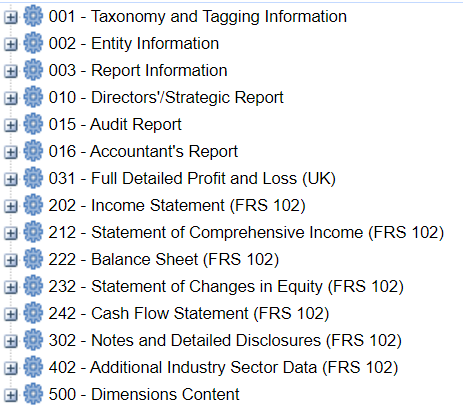
The presentation view is divided into sections by Extended Link Roles (ELRs), as shown in figure 1.
 Figure
- The top-level structure of the FRS 102 taxonomy. Each numbered section represents an Extended Link Role (ELR).
The XBRL specification does not determine a means of ordering ELRs. However, by convention, the FRC Taxonom
IES use the ELR number to order the display of the top-level sections in the presentation linkbase. So, the lower the ELR number, the earlier the section appears in displays. (This may not always be the case, but the ELR number provides a better ordering than alphabetical or other similar methods.)
3.4 Display of dimensions
Dimensions allow users to tag additional information to the numbers or text which form the financial statements and notes. This information identifies the characteristics of the number or text to which it is attached. For example, a number for ‘Property, Plant and Equipment’ may be tagged with dimensions which clarify that it represents the value of ‘Land’ rather than ‘Buildings’, or relates to an ‘Operating segment’.
3.4.1 RULE Software MUST make clear to users the available hypercubes for each line item tag and enable efficient choice between them, for example by displaying the hypercube name or a suitable description and enabling expansion to show hypercube dimensions.
Software SHOULD order displays of available hypercubes by the number of the hypercube Extended Link Role (ELR).
Display of available dimension tags for any line item tag must therefore be driven by the content of the definition linkbase.
In displaying dimension tags, software must make clear to users:
- the available hypercubes for any line item tag;
- the dimensions in the hypercube; and
- the dimension tags within each dimension.
A hypercube groups together a set of dimensions which may be used with a particular line item tag. Hypercubes provide a means of organising and controlling the use of dimensions. Most line item tags are attached to a single hypercube which determines the set of dimensions for that tag. However, some line items are attached to more than one hypercube, reflecting the different ways that the line item may be reported.
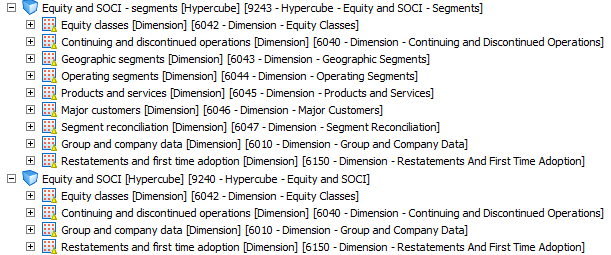
For example, the tag 'Equity' is attached to two hypercubes – one is the standard Equity and SOCI hypercube which enables items to be reported for different equity classes and the other is the Equity and SOCI segments hypercube which enables certain equity and comprehensive income items to be reported for different segments. Taggers of accounts will generally require the standard hypercube, but will occasionally require the segments hypercube, which contains more dimensions. Figure 3 shows the two hypercubes.
 Figure
- The two available hypercubes for the 'Equity' tag. The lower hypercube (9240) will normally be used, but the upper (9243) will be required for segment information.
Some other line item tags, particularly for financial instruments, are attached to several hypercubes. The large number of dimensions available for financial instruments is divided into different hypercubes to make tagging more manageable. Taggers select the dimension tags required from the single hypercube which meets their purpose. There are 'basic' financial assets and liabilities hypercubes which contain the most commonly used financial instrument dimensions and 'full' financial assets and liabilities hypercubes which contain all the financial instrument dimensions which may be required for more complex analysis. In addition, segments and other hypercubes may be required for certain financial instrument line item tags.
For example, the ‘Investments' tag is attached to four hypercubes:
- Financial assets - basic.
- Financial assets - full.
- Financial assets – segments.
- Investment movements. This hypercube contains dimension tags which enable movements in fixed asset investments to be tagged.
Failure to display available hypercubes clearly will not only make tag application more difficult but is likely to lead to errors in tagging.
Every hypercube is in a separate ELR in the definition linkbase. The number at the start of the ELR definition should be used for ordering display of hypercubes, in the same way as for the presentation link base described in section 3.3. Typically, the lower the ELR number on a hypercube for a particular line item, the more commonly the hypercube is likely to be used. (This may not always be the case, but the ELR number provides a better ordering than alphabetical or other similar methods.)
Within hypercubes, the available dimensions and dimension tags must also be displayed clearly to users.
3.4.2 RULE Software MUST make clear to users the available dimensions and dimension tags within a hypercube for each line item tag and also enable efficient choice between them. Software SHOULD show dimensions and dimension tags in the hierarchy and ordering defined in the definition linkbase.
As with the presentation linkbase, the structure of dimension tags in the definition linkbase has been chosen to help make clear their meaning and intended use. Some dimensions include heading items to organise dimension tags and some also include guidance tags. These should be retained in displays to help users navigate through the dimension tags.
In displaying available dimensions and dimension tags, software must follow the XBRL rules which determine the correct use of dimension tags with line item tags.
3.4.3 RULE Software displays of hypercubes, dimensions and dimension tags MUST accurately show the dimension tags which may be used in combination with each line item tag. Displays MUST NOT muddle together the content of separate hypercubes or encourage invalid uses or combinations of dimension tags.
The rules for use of dimension tags with line item tags are determined in the definition linkbase, described in section 4. Failure to represent these rules and associations clearly and accurately may lead to incorrect tagging and to invalid XBRL reports.
The form of display of dimensions information and tags is for software developers to determine. For example, dimension tags relevant to a particular line item tag could be displayed in either pop-up or fixed windows in tagging software. The rules set out above are purely concerned with the scope and logic of the dimensional information conveyed to the user.
3.5 Display of analysis items and groupings
Analysis items and groupings represent particular applications of dimensions.
The general rules for the display of dimensions set out in section 3.4 apply also to analysis items and tags within groupings, but additional points also apply to these tags.
Analysis items are all linked to the typed dimension 'x-Analysis [Dimension]'. Only one such dimension exists in the FRC taxonomies and it is uniquely defined by its domain type which is 'types:analysis'. As explained in the Tagging Guide, this domain is defined as being a positive integer.
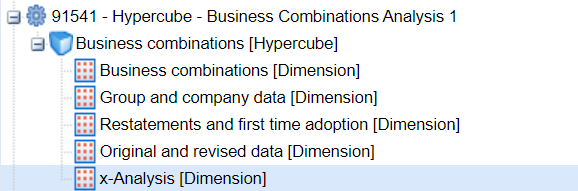
Analysis items may thus be recognised by their attachment to a hypercube which contains the analysis dimension. (They may also be recognised by the wording of their labels, which is described in the Tagging Guide, but this provides a less direct means of recognition.) All line item tags with such an attachment are analysis items; no line item tag is linked to the analysis dimension unless it is an analysis item. Figure 4 shows the dimensional attachments of the analysis item 'Further item of assets acquired [component of total assets acquired]'.
 Figure
- Dimensional attachments of the analysis item 'Further item of assets acquired [component of total assets acquired]', showing the analysis dimension.
Software should identify analysis items to users and support users in applying these tags correctly.
3.5.1 RULE Software MUST identify analysis item tags clearly in displays and provide supporting information to aid their correct use. Software MUST handle the integer value of the analysis dimension domain so that identical items are assigned the same integer, but different items are assigned a different integer.
For example, software might automatically cycle the integer value of the analysis typed domain if a tagger makes repeated use of an analysis item for different line items. However, software should make clear to users the integer value and the application of the analysis item, so that the same entry across time periods or duplicate entries will carry the same integer.
Tags in groupings are all linked to a grouping typed dimension. No line item tags are attached to a grouping typed dimension unless they are contained within a grouping.
Each separate grouping has a different grouping typed dimension. However, all grouping typed dimensions have the domain type 'types:grouping'. No other dimensions have this domain type.
All line item tags within a particular grouping may thus be uniquely recognised because:
- All will be attached to a hypercube containing a typed dimension with domain type 'types:grouping'; and
- All will be linked to the same grouping dimension. Line item tags in a different grouping will be linked to a different grouping dimension.
Line item tags within a grouping will also be shown as children of a 'grouping' parent item in the presentation linkbase. The grouping parent will be an abstract item with a 'groupingItemType' data type.
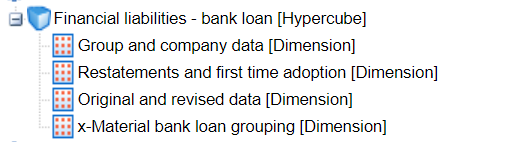
Figure 5 shows the presentation view of the material bank loan grouping. Figure 6 shows the dimensional attachments of the line item tags in this grouping.
 Figure
- Presentation view of the material bank loan grouping.
 Figure
- Dimensional attachments of tags in the material bank loan grouping.
Software should identify grouping items clearly to users and support users in applying grouping tags correctly.
3.5.2 RULE Software MUST identify grouping parents and the tags within them clearly in displays and provide supporting information to aid their correct use. Software MUST handle the integer value of the grouping dimension domain effectively, so that:
- the same integer value is assigned to items in the same occurrence of the grouping; and
- different integer values are assigned to different occurrences.
Clear identification of grouping items should help users understand and apply them correctly. Software should help users apply the same integer value to all items in the same occurrence of a grouping, including an occurrence reported across different type periods.
In tracing links of line item tags to hypercubes, developers should note that the same hypercube can occur in different ELRs, with different dimensional children in each case.
The structure of dimensions and ELRs in the definition linkbase and the correct application of integer values of typed dimensions are covered in more detail in section 4 on Dimensions.
3.6 Display of key information on tags
Taxonomy displays must provide users will all taxonomy information that supports the correct use and interpretation of tags. While some required information may vary with the nature and purpose of software applications, certain data is likely to helpful to users in almost all circumstances.
3.6.1 RULE Taxonomy displays MUST cover all key taxonomy information likely to be helpful to users in selecting and understanding the meaning of tags. Typically, this will require clear display of the following information on individual tags:
- Data type;
- Balance type;
- Period type;
- Abstract / non-abstract;
- Accounting references;
- Documentation field; and
- Linked dimensions (as described in section 3.4).
Displays SHOULD include all features likely to be helpful to users in recognising and locating items. This includes distinguishing different categories of items and linking to tags pointed to by cross-reference items. It also includes appropriate presentation of guidance items.
Data type is vital to the meaning and correct use of tags, distinguishing monetary, decimal, text string and similar categories. Data types used in the FRC taxonomies are listed in Appendix A.
Period type also aids in the identification of items and is tied to the correct application of period contexts to tags, covered in section 5.10.
Abstract line item tags cannot be used in tagging so should be clearly distinguished from non-abstract tags. They include heading and guidance items and are vital to correct presentation of the taxonomy. All dimension tags are abstract, but their use must be driven from the definition, not the presentation linkbase, as described in section 3.4.
The display of balance type, guidance information, accounting references and documentation fields are covered in the following sections.
3.7 Balance attribute
Balance type aids in the identification of items as well as providing a support for the correct entry of signs on monetary data. The latter is covered in section 5.5.
The credit / debit attribute has been applied to all monetary items which may participate in calculations or reconciliations. This includes cash flow and similar items, using the convention that 'credit' represents an outflow of cash while 'debit' represents an inflow.
The use of balance type with cash flow items does not tie in with standard accounting practice and the taxonomies include additional information to enable software to convert the credit / debit attributes to outflow / inflow signals.
Custom arc roles in the definition linkbase separately identify cash inflow and outflow tags:
- All cash inflow tags are linked to an 'x-Inflows [heading]' parent tag by an 'inflow' arcrole. (These relationships are defined in the ELR '9992 - Inflows'.)
- All cash outflow tags are linked to an 'x-Outflows [heading]' parent tag by an 'outflow' arcrole. (These relationships are defined in the ELR '9993 - Outflows'.)
3.7.1 RULE Software MAY supplement or replace balance attribute information on cash flow tags by identifying them as 'inflow' or 'outflow' items. All cash inflow items are the target of an 'inflow' arc in the definition linkbase and all cash outflow items are the target of an 'outflow' arc in the definition linkbase.
All cash flow monetary items carrying a balance attribute are a target of either an inflow or outflow arc.
3.8 Display of guidance information
Guidance information in the taxonomies includes:
- Heading items. These are abstract items with a 'headingItemType' data type;
- Guidance items. These are abstract items with a 'guidanceltemType' data type; and
- Cross-reference items. These are abstract items with a "xrefltemType' data type.
The Tagging Guide shows examples of these items. They provide important help to taxonomy users, giving pointers to correct ways of tagging and aiding in the location and selection of tags.
The individual data types of these items allow them to be reliably identified by software.
Heading and guidance items appear in both the presentation and definition linkbases. Cross-reference items are used only in the presentation linkbase.
Cross-reference items are linked to the tag to which they point through a custom arc role in the definition linkbase. The cross-reference item acts as a parent and the tag to which it points is the child (i.e. target) of the 'crossref' arcrole. (These relationships are defined in the ELR '9991 - Cross-References'.)
These cross-reference links will support 'hyperlinking' in presentation displays, enabling users to move directly to the target tag.
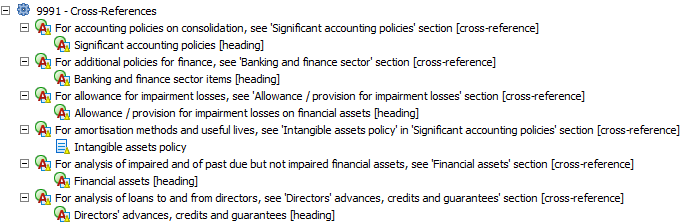 Figure
- Excerpt of cross-reference links.
The target tag may be an abstract heading or an ordinary line item tag, as the example shows. Each target tag only occurs once in the presentation linkbase for each individual taxonomy (although it may be sensible for software to allow for multiple occurrences in future taxonomy versions.)
3.8.1 RULE Software SHOULD display guidance items clearly to users, highlighting them where appropriate. Software SHOULD also leverage cross-reference links to enable users directly to locate the cross-referenced item or section.
3.9 Display of accounting references
References are described in the Tagging Guide section 3.9. They are defined in reference linkbases.
They provide an important guide to users on the authority and meaning of tags.
Figure 8 shows the reference information for the tag 'Comprehensive income (expense)'.
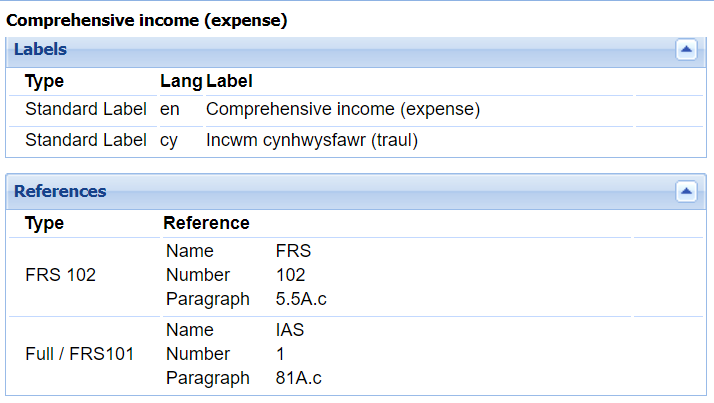 Figure
- References for tag for comprehensive income. In this display, the 'type' column shows the 'reference role' that identifies the standard to which the reference applies.
The references for a tag are available across all FRC taxonomies, even if references apply to differing standards. This is because the reference linkbases are common to all entry points. An FRS-102 entry point user should thus be able to see the references for IFRS Accounting Standards and FRS 101, as well as FRS 102. This comprehensive reference information should benefit users by providing complete information on the authority for a tag.
3.9.1 RULE Software SHOULD give users easy access to taxonomy references for line item tags, providing clear and comprehensive display of all reference information, including information from all reference roles. Reference displays MUST distinguish clearly between the various fields which make up reference information, linking related fields from the same reference role accurately together.
All accounting line item tags carry reference information.
Headings and other abstract items do not carry references.
It is not necessary to display accounting references for dimension tags. The only dimension tags which carry references are those for ISO country, currency, and language tags. This is principally for taxonomy control and maintenance purposes. The meaning of these tags is clear without the need for references.
3.10 Display of documentation fields
The documentation field / label for a line item tag provides additional guidance on the meaning and use of the tag. They are described in sections 3.5 and 3.10 of the Tagging Guide.
Only a limited proportion of line item tags carry information in the documentation field, but where they do, this information may be critical to correct use of the tag
3.10.1 RULE Software MUST make users aware when information is available in the documentation fields of individual tags and give users easy and efficient access to that information.
Documentation fields are not used for abstract tags and dimension tags.
4. Dimensions
4.1 Introduction to dimensions
This section describes the features and conventions adopted for dimensions in the definition linkbases of the FRC taxonomies.
It supplements information in the XBRL Dimensions Specification and should aid understanding of the handling of dimensions in the taxonomies. It does not supplant the rules and information set out in specification. Developers MUST follow the specification when designing and implementing software to handle the taxonomies and reports based on them. This section assumes that readers are already familiar with the requirements of the dimensions specification.
4.2 Structure and features of dimensions in the definition linkbase
Main aspects of the structure of dimensions in the definition linkbase are:
4.2.1 Dimensional data types
Dimension domain members, termed as 'dimension tags' elsewhere in this document, are abstract and have the data type 'nonnum:domainItemType'. No other tags have this data type.
Dimension elements, which identify dimensions and act as parents of dimensional domains, are abstract items of stringItemType, with the substitution group 'xbrldt:dimensionItem'. Their labels end in the term ‘[Dimension]'.
Hypercube elements define the combination of dimensions which may be used with individual line item tags. They are abstract items of stringItemType, with the substitution group 'xbrldt:hypercubeItem'. Their labels end in the term '[Hypercube]'.
4.2.2 Explicit dimensions
The taxonomies currently contain a total of 100 explicit dimensions. Each explicit dimension is defined in its own Extended Link Role (ELR). The definition includes the dimension element itself, dimension tags (comprising the domain parent and domain members) and the default member, if any. The dimension ELRs are numbered from 6001 onwards. (The current highest number used is
- There are gaps in the ELR numbering to allow the addition of other dimensions by subject group in future, if required.)
Arc roles used in the definition of explicit dimension content are 'dimension-domain', 'domain-member' and 'dimension-default'.
Although the section ‘500 – Dimensions Content' in the presentation linkbase shows the content of explicit dimensions, software MUST drive displays of usable dimension tags for any line item tag and the application of dimension tags from the definition linkbase. The latter contains the correct links to define the use of dimensions.
4.2.3 Typed dimensions
The taxonomies contain a total 24 typed dimensions. These comprise:
- One analysis dimension. This has the domain type 'types:analysis'. Its label is 'x-Analysis [Dimension]'; and
- 23 grouping dimensions. These have the domain type 'types:grouping'. Their labels begin with x-, followed by the label of the grouping parent, but without square brackets around grouping. An example is 'x-Individual issue of shares grouping [Dimension]'. There is a separate grouping dimension for each grouping defined in the taxonomy.
The domain of all typed dimensions is defined as a positive integer.
The content of typed dimensions does not require definition in individual ELRs since they have no explicit members. Their content is defined by their domain.
4.2.4 Hypercubes
The taxonomies contain a total of 214 hypercubes. Each occurrence of a hypercube is defined in its own ELR. Some hypercubes appear in more than one ELR, with adjusted content in each case to cover grouping dimensions and analysis items, as described below.
Each occurrence of a hypercube contains a set of dimensions as children. Explicit dimensions in a hypercube are tied to the dimension ELRs in which their content is defined by the 'target-role' attribute. Typed dimensions just appear as children without any target role attached.
Figure 9 shows the content of the 'Shares' hypercube, used for information on shares, including dividends. It contains only explicit dimensions.
![Hierarchical view of 'Shares [Hypercube]' with associated dimensions like 'Entity share classes' and 'Share types'.](https://media.frc.org.uk/images/page_26_img_0_fVoAxPK.original.png) Figure
Figure
- Shares hypercube.
Analysis item tags are attached to the hypercube appropriate for their subject matter. Thus, analysis item tags related to shares are attached to an occurrence of the shares hypercube which contains the standard shares dimensions shown in figure 9, with the addition of the analysis type dimension. This is shown in figure 10.
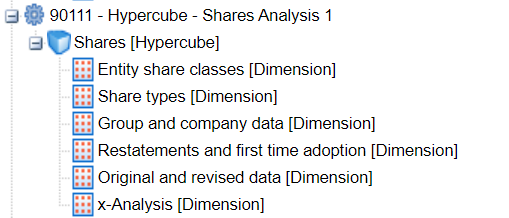 Figure
- Shares analysis hypercube.
This enables shares analysis item tags to be combined with the same dimension tags as ordinary share line item tags, but with the addition of the analysis dimension. This occurrence of the shares hypercube has to be contained in a separate ELR since it has different children from the ordinary occurrence.
(By convention, the number of the separate ELR has the same root as that of the ordinary occurrence ELR, but with an added integer. In this example, the ordinary ELR is 9011 and the analysis ELR number is 90111. This is purely for convenient identification and for suitable ordering of ELRs in displays of the full dimension linkbase in taxonomy tools. It has no other significance.)
The same principle applies to hypercubes for grouping items. Tags in groupings are attached to a version of the hypercube which is appropriate for their subject matter, but which also contains the appropriate grouping typed dimension. Figure 11 shows the hypercube for the grouping for individual issues of shares.
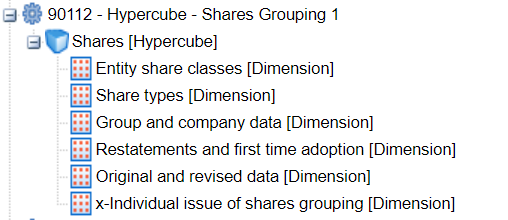 Figure
- Shares grouping hypercube
This enables line item tags contained in the 'individual issue of shares' grouping to be attached to the normal share dimensions and appropriate grouping dimension.
Each grouping has a different grouping typed dimension, so several occurrences of hypercubes may exist for areas which include a number of groupings. Each hypercube occurrence will contain a single grouping typed dimension and each will be in its own ELR. Figure 12 shows the two grouping occurrences for the Entity Officers hypercube.
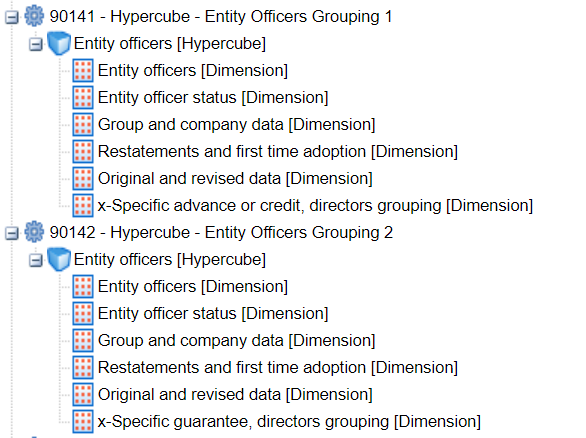 Figure
- Two entity officers grouping hypercubes.
The 'Basic hypercube', which contains the dimensions for group and company, restatements and original and revised data, has eight occurrences for eight separate groupings as well as an occurrence for the analysis dimension. However, most hypercubes do not have any grouping occurrences and those that do will generally only have one.
Grouping line item tags will only be attached to a single hypercube which contains the corresponding grouping typed dimension.
Analysis line item tags will only be attached to the hypercubes appropriate for their subject matter which contain the analysis item dimension. Unlike grouping item tags, an analysis item tag may be attached to more than one hypercube. In particular, financial instrument analysis items are typically attached to both the basic version of the financial instrument hypercube and the full version of the hypercube. For example, the analysis item 'Further item of financial assets [component of total financial assets]' is attached to both the 'Financial assets – basic' hypercube and the 'Financial assets – full' hypercube. However, the majority of analysis items are attached to a single hypercube.
Hypercubes are linked to dimensions by the 'hypercube-dimension' arc role. Since an individual hypercube may appear in several ELRs, more than 200 hypercube ELRs are used in the taxonomies. Their main numbering sequence begins at 9000 and currently ends at
- (The sequence contains some gaps to allow the insertion of new hypercubes in the future.)
An ELR 9990 is used for an 'Empty' hypercube. This is for a small number of line item tags which do not require any dimensions. An example of such a tag is 'UK Companies House registered number'.
As stated above, the numbering of ELRs in the definition linkbase is purely for convenient identification and suitable ordering in taxonomy tools displaying the full linkbase. It has no other significance.
Figure 13 shows an excerpt from the definition linkbase top-level view.
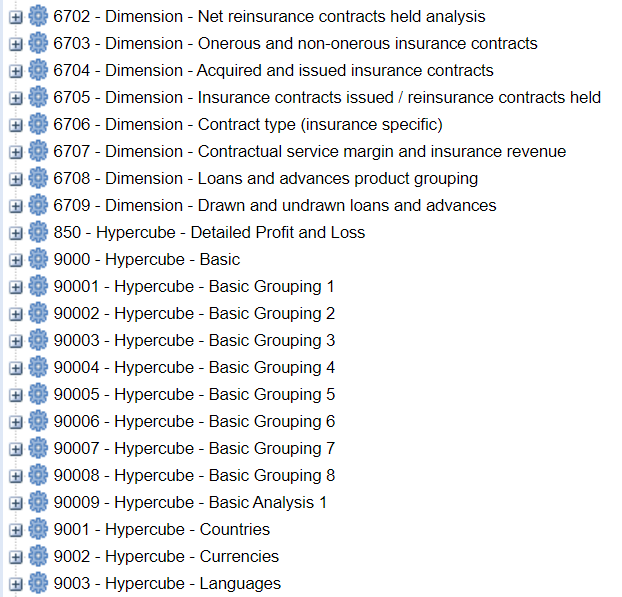 Figure
- Excerpt from definition linkbase top-level view, showing dimensions and hypercubes.
4.2.5 Primary items and hypercubes
An ELR containing a hypercube also contains the line item tags linked to that occurrence of the hypercube. These line item tags are termed 'primary items'.
Each hypercube ELR contains an ultimate parent which is an abstract string item which exists purely to bind the hypercube and primary items together. These parent items have labels ending '[Primary items]'. Figure 14 shows an example of the top-level structure for the 'Shares' hypercube.
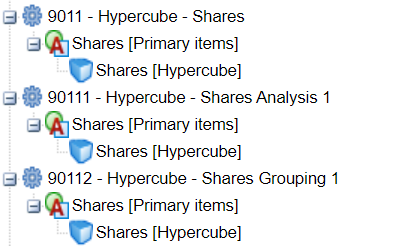 Figure
- Top-level structure for the 'Shares' hypercube.
As can be seen from figure 14, the same parent item is used with each hypercube in the ELRs in which the hypercube occurs. Effectively, the parent and hypercube form a pair and always appear together.
Line items which may be used with an occurrence of a hypercube are attached as children of the 'primary items' parent in the ELR containing the hypercube. For example, shares analysis items are attached as children of the ‘Shares [Primary items]' tag in the ELR '90111
- Hypercube - Shares Analysis 1'.
In the FRC taxonomies, parent items are attached to hypercubes using the 'all' arc role. (The taxonomies do not use the 'notAll' role which may be used in some complex dimensional constructions.)
All hypercubes are defined as closed. Effectively, this means that the relationship between primary items and dimensions is fixed by the taxonomy. A primary item cannot be reported with a dimension member to which it is not linked in a hypercube.
By convention, the 'all' arc is defined using the 'segment' element of context. The scenario element of context is not used. This is purely a matter of technical convention and does not alter the functionality of dimensions. (One or other part of context has to be chosen: segment was chosen for consistency with taxonomies elsewhere.)
Line item tags are attached to the primary items parent using the domain-member arc role.
All usable line item tags in the taxonomies are attached to at least one hypercube. Line item tags may be attached to a number of hypercubes, reflecting the different ways in which they may be reported, as stated in section 3.4. However, grouping item tags will only be attached to one hypercube in one ELR, reflecting their specific use, as described in section 4.2.4.
4.3 Rules on the application of dimension tags
The main aspects of the structure of dimensions in the definition linkbase are determined by the XBRL dimensions specification. The structure effectively sets the rules for the use of dimension tags, determining which dimension tags may be used with each line item tag.
Fundamentally, the specification requires that a combination of a line item tag and one or more dimension tags must be valid against at least one hypercube to which the line item is attached. The combination may be valid against multiple hypercubes, but this will only occur when the meaning of the tag combination is effectively the same under the different hypercubes (i.e. the dimension tags chosen are exactly replicated across the different hypercubes).
Effectively, the dimension tags that are used with a line item tag must be selected from one single hypercube to which the item is attached. The selection of dimension tags from different hypercubes, which cannot be matched against a single hypercube, will result in invalid data.
4.3.1 RULE
Software MUST correctly implement the dimension processing rules and requirements set out in the XBRL Dimensions Specification. Failure to do so will lead to invalid XBRL reports. Developers MUST NOT define rules for assignment of dimension tags based on particular conventions on labelling and structure adopted in the taxonomies.
The explanations in this document are intended to help developers understand the structure of dimensions in the taxonomies and implement software efficiently. However, in designing software to process dimensions, developers must follow the specification rather than the simplified explanation of validation rules given in this document.
They also must not base processes for assigning or validating dimensions on particular conventions adopted in the taxonomies. Conventions and approaches used in the taxonomy definition linkbases reflect good practice and the requirements of efficient taxonomy management and data analysis but may go beyond the explicit requirements of the specification. In certain circumstances in the future, it may not be possible or desirable fully to follow certain conventions. Developers must therefore rely on the specification rather than taxonomy convention.
If software incorporates a dimensional processor based on the specification, then it will implement rules on the application of dimension tags correctly.
4.4 Other aspects of dimensions
4.4.1 Defaults
Most explicit dimensions in the taxonomies include default domain members. As stated in section 4.2.2, these are identified by dimension-default links.
A small number of explicit dimensions do not include a default. When a line item tag attached to these to one of these dimensions is used, it must be combined with a tag selected from the dimension. (This would not be essential if the line item tag was also attached to another hypercube containing dimensions with defaults, since that hypercube would then apply, but this condition does not exist in the FRC taxonomies. The line items attached to dimensions without defaults are not attached to alternative hypercubes.)
Effectively, the lack of a default forces a user choice from the dimension.
Default tags have labels ending ‘[Default]' as well as being the targets of dimension-default links.
Defaults are defined 'globally' in the taxonomies. Each explicit dimension can only have a single default tag.
Typed dimensions do not support default members. The use of a line item tag attached to a typed dimension requires the selection of a positive integer value from the typed dimension domain.
Line item tags attached to typed dimensions are not attached to alternative hypercubes which do not contain the typed dimension concerned, so the selection of a value for the typed dimension is forced.
As stated in section 3.5 of this document and the Tagging Guide, the precise value of the integer chosen has no significance. The only requirement is that the same integer should be chosen for corresponding occurrences of a data item – i.e. occurrence of the same concept across time periods or fully duplicate occurrences.
Software must support users in correctly assigning typed domain integer values.
4.4.2 Prohibition of links in definition linkbase
The XBRL specification allows links in linkbases to be prohibited. This is of use in an extension taxonomy which modifies an imported taxonomy.
The FRC taxonomies make some limited use of prohibition. The FRS 102 taxonomy definition linkbase prohibits a small number of domain-member links in the core definition linkbase, effectively removing from use a small number of dimension tags which are not appropriate for FRS 102 accounts.
No other prohibitions are currently used, but they may be used in future FRC taxonomies and extensions.
4.4.2.1 RULE
Software MUST correctly implement prohibitions in linkbases. Failure to do so is likely to lead to incorrect tagging and invalid XBRL data.
5. Support for data entry
5.1 Introduction to data entry
This section briefly highlights a number of required aspects of data entry which XBRL software is expected to support. It is not a comprehensive list of all such features. It highlights some particularly important points as well as some issues which may be overlooked.
The general stipulation is that software MUST support the data entry requirements set out in the Tagging Guide and the XBRL specifications.
5.2 Generic dimension tags – use and identification
As stated in section 4.11 of the Tagging Guide, each generic dimension tag used in an XBRL must be identified by the associated name or description tag.
Appendix E sets out the generic dimension tags in the current FRC taxonomies and their related name or description tag.
5.2.1 RULE
Software MUST support the correct use of a name or description tag with any generic dimension tag which occurs in an XBRL report.
The choice of mechanisms for achieving this is up to software developers. They may include warning messages and prompts to users and checks to ensure that a name or description tag is used in combination with every generic dimension tag which exists in a report.
This general requirement is unchanged from that with the previous accounts taxonomies, but the list of generic dimension tags and associated name / description tags is different in detail in the new taxonomies.
5.3 Fixed value tags
Fixed value tags are described in section 4.12 of the Tagging Guide.
5.3.1 RULE
Software MUST support the correct application of fixed value tags, ensuring that each use of such a tag is combined with an appropriate tag from the associated dimension which defines the meaning of the tag
Appendix C sets out the fixed value tags in the current taxonomies and their associated dimensions.
Fixed value tags all have the 'fixedItemType' data type.
Fixed value tags are expected to appear in the 'hidden' section of iXBRL reports, since they are not directly applied to textual values in reports.
5.4 Concatenation of text
The latest version of the Inline XBRL specification, version 1.1, supports the concatenation of text fragments under one text string tag.
5.4.1 RULE
Software MUST support the application of a text string tag across separate sections of text in accordance with the latest version of the Inline XBRL Specification.
This will enable a text tag to be applied across all relevant text, even if the latter is broken up into different sections – for example before and after a financial table or on different pages of a report.
Concatenation is handled using the ix:continuation element, introduced in version 1.1 of the Inline XBRL specification.
5.5 Positive and negative values
The requirements for assignment of positive and negative signs to data are the same under the FRC taxonomies as under the previous accounts taxonomies. This is still driven by the label of tags, as described in section 5.3 of the Tagging Guide.
5.5.1 RULE
Software MUST support the correct application of positive or negative signs to numeric data.
While sign allocation is straightforward for most data, it can be confusing in certain cases. Correct allocation is clearly vital to provision of accurate XBRL information. Software developers should implement all reasonable mechanisms to support the accurate application of signs. In some cases, checks on the summation of data, discussed in section 5.14 below, may help achieve this.
5.6 Scale and accuracy
5.6.1 RULE
Software MUST support the correct use of the scale and decimals attributes in setting the presentation and accuracy of numeric information in iXBRL reports. The precision attribute MUST NOT be used.
The scale attribute, defined in the iXBRL specification, determines the scale at which numbers are presented in reports.
The decimals attribute, defined in the main XBRL specification, determines the number of decimal places to which a particular figure is accurate. The use of the decimals attribute rather than the precision attribute, which is also defined in the specification, is mandated for determining the accuracy of numbers in XBRL reporting in the UK. This is for simplicity and to avoid certain difficulties which can arise with the use of precision.
Software should guide users as far as is practical in correct application of these attributes.
5.7 Currencies
5.7.1 RULE
Software MUST support the correct currency designation to monetary and other items which are measured in a currency.
Tags of perShareItemType and monetaryItemType will always represent values measured in a currency.
Software may aid users by enabling them to set the default currency for a report.
Note that the currencies dimension is not used for assigning currencies to reported monetary values. It is used to identify the currency related to particular declarations and the underlying currency in which financial instruments are denominated.
5.8 Nesting of tags
5.8.1 RULE
Software SHOULD support the nesting of numeric tags in Inline XBRL. Software MUST support nesting of tags within text string tags.
The latest version of Inline XBRL has introduced the ability to nest numeric tags. As described in section 4.24 of the Tagging Guide, this allows the same piece of data to be tagged with a series of numeric tags.
This enables users efficiently to tag a numeric item which represents more than one piece of information. Users otherwise will have to repeat and tag this data within the hidden section of iXBRL reports.
Software must support the nesting of other tags within data tagged with text tags. This has always been supported by Inline XBRL and is essential to allow the tagging of numeric and other data contained within sections of text which are also tagged.
5.9 Entity context
5.9.1 RULE
Software MUST support the correct setting of entity contexts to identify the entity to which iXBRL data applies.
As stated in section 5.11 of the Tagging Guide, all entities which have a Companies House registered number must use this as the base for their entity identifier in context. Other entities must use equivalent information based on the authority which regulates them.
5.10 Period context
5.10.1 RULE
Software MUST support the correct setting of period contexts.
The rules for period context are set out in the XBRL specification and in section 5.5 of the Tagging Guide.
Software must correctly apply period contexts to current and previous periods, reflecting in particular the requirements on start and end of periods explained in the Tagging Guide.
5.11 Dates
5.11.1 RULE
Software MUST support entry of dates in the correct format.
As stated in section 5.6 of the Tagging Guide, tags of date type require XBRL values in the format yyyy-mm-dd. Conversion to other formats is achieved through iXBRL transformation rules.
5.12 Percentages
5.12.1 RULE
Software MUST support entry of percentages in the correct format.
Tags of percentage type require XBRL values in decimal notation, so, for example, 60% is represented in XBRL as 0.6. Software should enable users to enter percentages in a simple and efficient manner, without users having to be aware of XBRL rules on formatting of percentages.
5.13 Boolean items
5.13.1 RULE
Software MUST support efficient entry of boolean tags.
Boolean tags are expected to be entered in the hidden section of iXBRL reports, since they cannot normally be attached to viewable text in a report. Software should support preparers in assigning correct values to required boolean tags. Some boolean tags only need to be used if they represent a 'TRUE' value, as explained in section 5.8 of the Tagging Guide.
5.14 Completeness, accuracy and summation
The FRC taxonomies are intended to support the complete tagging of the main financial data and schedules in financial statements. The taxonomies help to enable this by providing analysis items for key areas of reporting as well as 'non-standard' dimension tags.
5.14.1 RULE
Software MUST support users in achieving as complete tagging as practical of the main financial data and schedules in financial reports and in helping to test the completeness and accuracy of tagging.
The means of achieving this is up to developers. However, testing the summation of the components of some key data items against the reported total provides one means of checking the completeness and accuracy of tagged data.
Taxonomy information published on the FRC XBRL website at https://xbrl.frc.org.uk/ includes documentation outlining consistency checks which may be used to test summation and other aspects of tagged data.
It is recognised that the use of analysis items and other techniques will not guarantee that particular sections of tagged data will always sum correctly. However, many sections may be expected to do so in the general case. Consistency checks of various types should allow the completeness and accuracy of tagging to be tested and help preparers of tagged accounts to identify errors or weaknesses in tagged information.
6. Other technical information
6.1 Taxonomy availability
As stated in section 6.1 of the Tagging Guide, the FRC taxonomies are available for download as a zip file from the FRC website at https://xbrl.frc.org.uk/.
Their content, with the exception of the definition linkbases, can be viewed over the internet at https://uk-taxonomies-tdp.corefiling.com/yeti.
The taxonomy files are also published on FRC website pages which match the locations declared within the files themselves. Software developers may use these pages as authoritative references for taxonomy content.
6.2 Element naming
The names of taxonomy tags are derived directly from the standard label.
This is intended to help developers and others read the underlying taxonomy files and to aid understanding and implementation of the taxonomies.
The basic rules for the creation of element names are:
- Drop spaces from the standard label and convert to camel case, starting with a capital.
- Drop all punctuation characters apart from '-' and '.' (hyphen and stop).
- Remove the words: a, the, at, and, of, is.
6.3 Taxonomy file structure
A conceptual diagram of the taxonomies is shown in section 6 of the Tagging Guide. The current list of folders and files in the taxonomies is shown in Appendix F.
6.4 Arc roles
The list of arc roles currently used in the taxonomies is shown in Appendix B.
Other arc roles defined through XBRL International are not used. The essence-alias arcs used for a limited number of tags in the old UK accounts taxonomies are not required in the FRC taxonomies.
6.5 Roles
The list of roles currently used in the taxonomies is shown in Appendix D.
6.6 Inline XBRL
Further information on the use of Inline XBRL in the UK is provided in the HMRC CT Inline XBRL Style Guide [Ref 5] available via https://www.gov.uk/government/publications/corporation-tax-technical-specifications-xbrl-and-ixbrl. The current version of this Guide is published at https://assets.publishing.service.gov.uk/government/uploads/system/uploads/attachment_data/file/434588/xbrl-style-guide.pdf.
In Ireland, the Revenue Commissioners publish several technical documents for iXBRL filers and developers, including a Style Guide, each of which can be found in the Further Guidance section of the Revenue Commissioners' “Technical Information” web page: https://www.revenue.ie/en/companies-and-charities/submitting-financial-statements/technical-information.aspx.
6.7 Taxonomy versioning
In principle only two versions of the taxonomies should be in use by preparers and developers; the latest version and the penultimate version. This is to ensure that preparers comply with the full tagging requirement from HMRC. Versions of the full suite of FRC taxonomies for 2026 were released on 18 November
- All reporters may elect to use this 2026 taxonomy suite.
The previous version of the full suite of FRC taxonomies for 2025 was released on 18 October 2024. The 2024, 2023, 2022, 2021, 2019 and 2014 versions of the taxonomies should only be used prior to 1 January
- They should not be used to report with post this date, because full, up-to-date tagging using these versions will not be possible. HMRC are seeking views on shutting down the use of these versions and the ability to report to HMRC using products based on these versions.
Developers should make it clear to preparers in their applications which versions of the taxonomy are available to use, and which version is being used at any given time. This will assist preparers to comply with the guidance above. For full details on which suite of taxonomies to use please refer to the FRC website.
In Ireland, it should be noted that the use of taxonomies is restricted to certain periods and the Revenue Commissioners publishes a list of accepted taxonomies and the periods to which they apply in their "Technical Note” https://www.revenue.ie/en/online-services/support/documents/ixbrl/ixbrl-technical-note.pdf.
7. Deprecation Policy
When it is necessary to remove some part of a UK Taxonomy, the following process will be followed:
7.1 Deprecation Timeline
The Deprecation Timeline is the period between announcing that a tag is deprecated to fully removing it from the taxonomy altogether.
- Deprecated tags will be available for one taxonomy version before being removed (i.e. a tag marked as “deprecated” in the 2024 taxonomy will not be available in the 2025 taxonomy).
- Where the standard or regulation requires deprecated tags to be available for longer than a year, tags will be deprecated when no longer relevant, or the standard or regulation permits removal.
- Historical taxonomies are available on the FRC Taxonomies webpage for those who have a legitimate need for them, or for reference.
7.2 Informing users
- Information relating to deprecations will be available on the FRC Taxonomies webpage.
- Deprecations are clearly marked in the mapping file for each taxonomy. Mapping files show the changes from the current taxonomy year version to the previous taxonomy year version and will be available on the FRC Taxonomies webpage.
- Deprecations are included in the Guidance document produced for each version of taxonomy. These will be available on the FRC Taxonomies webpage.
7.3 Changes to the taxonomy
- Where relevant, a 'deprecated' label is added to the tag to advise taxonomy users on appropriate usage and/or alternative tag(s).
- The label of a deprecated tag will be updated to include the word 'deprecated' and the date of deprecation.
Appendices
A: Data types
The following data types are used in the FRC taxonomies:
| # | Common name | Purpose | XBRL name |
|---|---|---|---|
| 1 | Monetary | To represent monetary values | monetaryItemType |
| 2 | String item / text item | To represent ordinary textual information | stringItemType |
| 3 | Decimal | To represent ordinary numbers | decimalItemType |
| 4 | Shares | To represent numbers of shares, options and related instruments | sharesItemType |
| 5 | Per share | To represent values per share | num:perShareItemType |
| 6 | Percent | To represent percentage values | num:percentItemType |
| 7 | Date | To represent specific dates in a yyyy-mm-dd format | dateItemType |
| 8 | Boolean | To represent true / false statements | booleanItemType |
| 9 | URI | To represent URIs | anyURIItemType |
| 10 | Domain member | To represent usable values of a dimension | nonnum:domainItemType |
| 11 | Pure | To represent pure values | pureItemType |
| 12 | Energy | To represent energy values | num:energyItemType |
| 13 | Greenhouse gas emissions item type | To measure Global Warming Potential | dtr2022:ghgEmissionsItemType |
| 14 | Nonnegative decimal | To represent nonnegative ordinary numbers | types:nonNegativeDecimalItemType |
| 15 | Fixed item | Items taking predefined values | types:fixedItemType |
| 16 | Grouping parent | Parents of groupings | types:groupingItemType |
| 17 | Guidance item | Items providing information or guidance | types:guidanceItemType |
| 18 | Heading item | Headings of sections | types:headingItemType |
| 19 | Cross-reference item | Items pointing to other related information | types:xrefItemType |
Data types 1-10 are defined via XBRL International. Types 14-19 are defined in the UK taxonomies.
B Arcs and arc roles
The following arcs are used in the FRC taxonomies:
| # | Name | URI | Applies To |
|---|---|---|---|
| 1 | concept-label | http://www.xbrl.org/2003/arcrole/concept-label | Label arc |
| 2 | parent-child | http://www.xbrl.org/2003/arcrole/parent-child | Presentation arc |
| 3 | concept-reference | http://www.xbrl.org/2003/arcrole/concept-reference | Reference arc |
| 4 | dimension-domain | http://xbrl.org/int/dim/arcrole/dimension-domain | Definition arc |
| 5 | domain-member | http://xbrl.org/int/dim/arcrole/domain-member | Definition arc |
| 6 | dimension-default | http://xbrl.org/int/dim/arcrole/dimension-default | Definition arc |
| 7 | all | http://xbrl.org/int/dim/arcrole/all | Definition arc |
| 8 | hypercube-dimension | http://xbrl.org/int/dim/arcrole/hypercube-dimension | Definition arc |
| 9 | crossref | http://xbrl.frc.org.uk/general/types/arcroles/crossref | Definition arc |
| 10 | inflow | http://xbrl.frc.org.uk/general/types/arcroles/inflow | Definition arc |
| 11 | outflow | http://xbrl.frc.org.uk/general/types/arcroles/outflow | Definition arc |
Arc roles 1-8 are defined via XBRL International. Roles 9-11 are defined in the UK taxonomies. Roles 4-8 are used to define dimension relationships.
C: Fixed value tags
The following are the tags in the FRC taxonomies of 'fixedItemType', as described in section 5.3.
| # | Label | Key dimension |
|---|---|---|
| 1 | Country of formation or incorporation | Countries and regions |
| 2 | Country in which parent of largest group is incorporated | Countries and regions |
| 3 | Country in which parent of smallest group is incorporated | Countries and regions |
| 4 | Country of incorporation or residence of associate | Countries and regions |
| 5 | Country of incorporation or residence of joint venture | Countries and regions |
| 6 | Country of incorporation or residence of subsidiary | Countries and regions |
| 7 | Director signing financial statements | Entity officers |
| 8 | Director signing Directors' Report | Entity officers |
| 9 | Principal currency used in business report | Currencies |
| 10 | Other currency used in business report | Currencies |
| 11 | Entity trading status | Entity trading status |
| 12 | Report period | Report period |
| 13 | Report principal language | Languages |
| 14 | Scope of accounts | Scope of accounts |
| 15 | Accounting standards applied | Accounting standards |
| 16 | Accounts status, audited or unaudited | Accounts status |
| 17 | Accounts type | Accounts type |
| 18 | Applicable legislation | Applicable legislation |
| 19 | Entity is under special legal status | Entity special legal status |
| 20 | Legal form of entity | Legal form of entity |
| 21 | Main industry sector | Main industry sector |
| 22 | SORPs applied | SORPs |
The key dimension column shows the dimension which principally identifies the value of each fixed item type tag. The dimensions in rows 1-14 have defaults; those in rows 15-22 do not. The default values are not necessarily the expected value for the fixed item type tags. The dimensions concerned have broad uses and are attached to a range of line item tags. Users MUST select the correct dimension tag for each occurrence of a fixed item type tag.
Future extensions to the FRC taxonomies for industry sectors may introduce new fixed value tags.
D: Roles
The following are the roles used in the FRC taxonomies
| # | Name | URI | Applies To |
|---|---|---|---|
| 1 | Standard Label | http://www.xbrl.org/2003/role/label | Label |
| 2 | Verbose Label | http://www.xbrl.org/2003/role/verboseLabel | Label |
| 3 | Documentation | http://www.xbrl.org/2003/role/documentation | Label |
| 4 | Reference | http://www.xbrl.org/2003/role/reference | Reference |
| 5 | FRS 101 | http://xbrl.frc.org.uk/general/ref/roles/FRS101 | Reference |
| 6 | FRS 102 | http://xbrl.frc.org.uk/general/ref/roles/FRS102 | Reference |
| 7 | Full | http://xbrl.frc.org.uk/general/ref/roles/Full | Reference |
| 8 | Full / FRS101 | http://xbrl.frc.org.uk/general/ref/roles/fullFRS101 | Reference |
| 9 | Audit Regulations | http://xbrl.frc.org.uk/general/ref/roles/AuditRegs | Reference |
| 10 | Companies Act | http://xbrl.frc.org.uk/general/ref/roles/CompaniesAct | Reference |
| 11 | Standard | http://xbrl.frc.org.uk/general/ref/roles/Standard | Reference |
The roles in rows 1-4 are standard XBRL roles, while those in rows 5-11 are for UK references.
E. Generic dimension tags
The table below shows generic dimension tags in the current taxonomies and their associated name or description tag.
| Dimension | Generic dimension tags | Taxonomies | Related name or description tag |
|---|---|---|---|
| Continuing and discontinued operations | Specific discontinued operation 1 to 8 | All | Description of discontinued operation or non-current assets or disposal group held for sale |
| Specific non-current assets / disposal group held for sale 1 to 8 | All | ||
| Chairman | |||
| Chief executive | |||
| Chairman and chief executive | All | ||
| Senior partner, limited liability partnership | |||
| Company secretary 1 to 2 | All | ||
| Entity officers | Company secretary and director 1 to 2 | All | Name of entity officer |
| Director 1 to 40 | All | ||
| Partner, LLP, 1 to 20 | All | ||
| Trustee 1 to 20 | Char | ||
| Corporate trustee 1 to 3 | Char | ||
| Director 1 of corporate trustee to 3 | Char | ||
| Custodian trustee 1 to 3 | Char | ||
| Operating segments | Reportable operating segment 1 to 20 | All | Name of individual segment |
| Products and services | Product and service 1 to 12 | All | Name of individual segment |
| Major customers | Major customer 1 to 12 | All | Name of individual segment |
| Business combinations | Specific business combination 1 to 10 | All | Name of acquired entity |
| Biological asset classes | Consumable biological asset class 1 to 5 | All | Name or description of biological asset class |
| Bearer biological asset class 1 to 5 | All | ||
| Subsidiaries | Subsidiary 1 to 200 | All | Name of subsidiary |
| Associates | Associate 1 to 50 | All | Name of associate |
| Joint ventures | Joint venture 1 to 50 | All | Name of joint venture |
| Unconsolidated structured entities | Unconsolidated structured entity 1 to 5 | All | Name of unconsolidated structured entity |
| Intermediate parent 1 to 5 | All | ||
| Entity with joint control or significant influence 1 to 5 | All | ||
| Another group member 1 to 8 | All | ||
| Trustee / trustees 1 to 5 | Char | ||
| Close family member of trustee / trustees 1 to 5 | Char | ||
| Related parties | Entity controlled by trustees 1 to 5 | Char | Name or description of related party [if not defined by another tag] |
| Key management individual / group 1 to 5 | All | ||
| Close family member 1 to 5 | All | ||
| Entity controlled by key management personnel 1 to 5 | All | ||
| Other related party relationship type 1 to 2 | All | ||
| [component of total related parties] | |||
| Entity share classes | Ordinary share class 1 to 5 | All | Description of share type |
| Preference share class 1 to 5 | All | ||
| Deferred share class 1 to 5 | All | ||
| Other share class 1 to 5 | All | ||
| Share-based payment arrangements | Share-based arrangement 1 to 8 | All | Name of share-based payment arrangement |
| Share-based payment grants | Grant 1 to 10 | All | Name or description of grant under share-based payment arrangement |
| Post-employment benefit plans | Pension plan 1 to 6 | All | Name of defined contribution plan |
| Post-employment medical plan 1 to 2 | All | ||
| Other post-employment benefit plan 1 to 2 | All | Name of defined benefit plan | |
| Activity | Activity 1 to 50 | Char | Description of activity |
| Material funds | Material fund 1 to 50 | Char | Description of material fund |
| Linked charity | Linked charity 1 to 5 | Char | Description of activities of linked charity |
| Institutional Grant Recipient | Name of grant recipient 1 to 50 | Char | Name of specific institutional grant recipient |
| Concessionary loans | Concessionary loan 1 to 50 | Char | Description of concessionary loan |
| Contract Type | Other contract type 1 to 2 | All | Description of other contract type |
| Contract Duration | Other duration type 1 to 2 | All | Description of other contract duration type |
| Sales Channel | Other channel type 1 to 2 | All | Description of other sales channel type |
Updates to the FRC taxonomies or extensions to cover particular industry sectors may introduce additional generic dimension tags.
F: Taxonomy file structure
The following table shows the folders and files comprising the new FRC taxonomies.
Notes:
- The root location is xbrl.frc.org.uk/
- 'Basic' schemas define the elements and key features of each component taxonomy. 'Entry point' schemas for component taxonomies import the basic schema and tie in presentation linkbases through a linkbase reference.
- Namespaces of the basic schemas are based on their absolute locations. Namespaces of entry point schemas include the characters '-full' inserted at the end of the basic schema namespace, e.g. ...cd/yyyy-mm-dd/currencies-full/.
| Location | Prefix | Comments and namespaces |
|---|---|---|
| xbrl.frc.org.uk/ | ||
| cd/ | ||
| yyyy-mm-dd/ | ||
| business/ | ||
| bus-yyyy-mm-dd.xsd | bus | Basic schema for Business |
| bus-yyyy-mm-dd-definition.xml | http://xbrl.frc.org.uk/cd/yyyy-mm-dd/business | |
| bus-yyyy-mm-dd-presentation.xml | ||
| bus-yyyy-mm-dd-label.xml | ||
| bus-yyyy-mm-dd-reference.xml | ||
| bus-full-yyyy-mm-dd.xsd | bus-full | Entry point for Full Business |
| http://xbrl.frc.org.uk/cd/yyyy-mm-dd/business-full | ||
| countries-regions/ | ||
| countries-yyyy-mm-dd.xsd | countries | Basic schema for Countries and Regions |
| countries-yyyy-mm-dd-definition.xml | http://xbrl.frc.org.uk/cd/yyyy-mm-dd/countries | |
| countries-yyyy-mm-dd-presentation.xml | ||
| countries-yyyy-mm-dd-label.xml | ||
| countries-yyyy-mm-dd-reference.xml | ||
| countries-full-yyyy-mm-dd.xsd | countries-full | Entry point for Full Countries and Regions |
| http://xbrl.frc.org.uk/cd/yyyy-mm-dd/countries-full | ||
| currencies/ | ||
| currencies-yyyy-mm-dd.xsd | curr | Basic schema for Currencies |
| currencies-yyyy-mm-dd-definition.xml | http://xbrl.frc.org.uk/cd/yyyy-mm-dd/currencies | |
| currencies-yyyy-mm-dd-presentation.xml | ||
| currencies-yyyy-mm-dd-label.xml | ||
| currencies-yyyy-mm-dd-reference.xml | ||
| currencies-full-yyyy-mm-dd.xsd | currencies-full | Entry point for Full Currencies |
| http://xbrl.frc.org.uk/cd/yyyy-mm-dd/currencies-full | ||
| languages/ | ||
| languages-yyyy-mm-dd.xsd | lang | Basic schema for Languages |
| languages-yyyy-mm-dd-definition.xml | http://xbrl.frc.org.uk/cd/yyyy-mm-dd/languages | |
| languages-yyyy-mm-dd-presentation.xml | ||
| languages-yyyy-mm-dd-label.xml | ||
| languages-yyyy-mm-dd-reference.xml | ||
| languages-full-yyyy-mm-dd.xsd | languages-full | Entry point for Full Languages |
| http://xbrl.frc.org.uk/cd/yyyy-mm-dd/languages-full | ||
| cic/ | ||
| yyyy-mm-dd/ | ||
| cic-yyyy-mm-dd.xsd | cic | Basic schema for CIC |
| cic-yyyy-mm-dd-definition.xml | http://xbrl.frc.org.uk/cic/yyyy-mm-dd | |
| cic-yyyy-mm-dd-label.xml | ||
| cic-yyyy-mm-dd-reference.xml | ||
| cic34/ | ||
| cic34-yyyy-mm-dd.xsd | cic34 | Entry point for CIC34 |
| cic34-yyyy-mm-dd-presentation.xml | http://xbrl.frc.org.uk/cic/yyyy-mm-dd/cic34 | |
| dpl/ | ||
| yyyy-mm-dd/ | ||
| dpl-yyyy-mm-dd.xsd | Entry point for Detailed Profit and Loss | |
| dpl-yyyy-mm-dd-definition.xml | http://xbrl.frc.org.uk/dpl/yyyy-mm-dd | |
| dpl-yyyy-mm-dd-presentation.xml | ||
| dpl-yyyy-mm-dd-label.xml | ||
| dpl-core-yyyy-mm-dd.xsd | ||
| dsep/ | ||
| yyyy-mm-dd/ | ||
| AA06/ | ||
| AA06-yyyy-mm-dd.xsd | Entry point for AA06 | |
| AA06-yyyy-mm-dd-presentation.xml | accrep | http://xbrl.frc.org.uk/dsep/yyyy-mm-dd/AA06 |
| agreement/ | ||
| agreement-yyyy-mm-dd.xsd | Entry point for DSEP Agreement | |
| agreement-yyyy-mm-dd-presentation.xml | http://xbrl.frc.org.uk/dsep/yyyy-mm-dd/agreement | |
| dsep-yyyy-mm-dd.xsd | Basic schema for DSEP | |
| dsep-yyyy-mm-dd-definition.xml | http://xbrl.frc.org.uk/dsep/yyyy-mm-dd | |
| dsep-yyyy-mm-dd-label.xml | ||
| dsep-yyyy-mm-dd-reference.xml | accrep-full | |
| fr/ | ||
| yyyy-mm-dd/ | ||
| core/ | ||
| frc-core-yyyy-mm-dd.xsd | core | Basic schema for Core Financial Reporting |
| frc-core-yyyy-mm-dd-definition.xml | http://xbrl.frc.org.uk/cd/yyyy-mm-dd/core | |
| frc-core-yyyy-mm-dd-presentation.xml | ||
| frc-core-yyyy-mm-dd-label.xml | ||
| frc-core-yyyy-mm-dd-reference.xml | core-full | |
| frc-core-full-yyyy-mm-dd.xsd | Entry point for Full Core Financial Reporting | |
| http://xbrl.frc.org.uk/cd/yyyy-mm-dd/core-full | ||
| FRS-101/ | ||
| yyyy-mm-dd/ | ||
| FRS-101-yyyy-mm-dd.xsd | FRS-101 | Entry point for FRS 101 |
| FRS-101-yyyy-mm-dd-presentation.xml | http://xbrl.frc.org.uk/FRS-101/yyyy-mm-dd | |
| FRS-102/ | ||
| yyyy-mm-dd/ | ||
| FRS-102-yyyy-mm-dd.xsd | FRS-102 | Entry point for FRS 102 |
| FRS-102-yyyy-mm-dd-presentation.xml | http://xbrl.frc.org.uk/FRS-102/yyyy-mm-dd | |
| UKSEF/ | ||
| FRS-102-yyyy-mm-dd.xsd | uksef | Entry point for FRS 102-UKSEF |
| FRS-102-yyyy-mm-dd-presentation.xml | http://xbrl.frc.org.uk/uksef/yyyy-mm-dd | |
| IFRS/ | ||
| yyyy-mm-dd/ | ||
| IFRS-yyyy-mm-dd.xsd | IFRS | Entry point for UK IFRS |
| IFRS-yyyy-mm-dd-presentation.xml | http://xbrl.frc.org.uk/IFRS/yyyy-mm-dd | |
| UKSEF/ | ||
| IFRS-yyyy-mm-dd.xsd | uksef | Entry point for UK IFRS-UKSEF |
| IFRS-yyyy-mm-dd-presentation.xml | http://xbrl.frc.org.uk/uksef/yyyy-mm-dd | |
| general/ | ||
| yyyy-mm-dd/ | ||
| common/ | ||
| common-yyyy-mm-dd.xsd | common | Schema defining common tags used in all taxonomies |
| common-yyyy-mm-dd-label.xml | http://xbrl.frc.org.uk/general/yyyy-mm-dd/common | |
| ref/ | ||
| ref-yyyy-mm-dd.xsd | uk-ref | Schema defining additional reference parts used in UK |
| types/ | http://xbrl.frc.org.uk/general/yyyy-mm-dd/ref | |
| types-yyyy-mm-dd.xsd | types | Schema defining additional data types used in UK |
| http://xbrl.frc.org.uk/general/yyyy-mm-dd/types | ||
| reports/ | ||
| yyyy-mm-dd/ | ||
| accrep/ | ||
| accrep-yyyy-mm-dd.xsd | accrep | Basic schema for Accountant's Report |
| accrep-yyyy-mm-dd-definition.xml | http://xbrl.frc.org.uk/reports/yyyy-mm-dd/accrep | |
| accrep-yyyy-mm-dd-presentation.xml | ||
| accrep-yyyy-mm-dd-label.xml | ||
| accrep-yyyy-mm-dd-reference.xml | accrep-full | |
| accrep-full-yyyy-mm-dd.xsd | Entry point for Accountant's Report | |
| http://xbrl.frc.org.uk/reports/yyyy-mm-dd/accrep-full | ||
| aurep/ | ||
| aurep-yyyy-mm-dd.xsd | aurep | Basic schema for Audit Report |
| aurep-yyyy-mm-dd-definition.xml | http://xbrl.frc.org.uk/reports/yyyy-mm-dd/aurep | |
| aurep-yyyy-mm-dd-presentation.xml | ||
| aurep-yyyy-mm-dd-label.xml | ||
| aurep-yyyy-mm-dd-reference.xml | aurep-fees | |
| aurep-fees-yyyy-mm-dd.xsd | Entry point for fees section of Audit Report | |
| aurep-fees-yyyy-mm-dd-presentation.xml | http://xbrl.frc.org.uk/reports/yyyy-mm-dd/aurep-fees | |
| aurep-full-yyyy-mm-dd.xsd | aurep-full | Entry point for Full Audit Report |
| http://xbrl.frc.org.uk/reports/yyyy-mm-dd/aurep-full | ||
| direp/ | ||
| direp-yyyy-mm-dd.xsd | direp | Basic schema for Directors' Report |
| direp-yyyy-mm-dd-definition.xml | http://xbrl.frc.org.uk/reports/yyyy-mm-dd/direp | |
| direp-yyyy-mm-dd-presentation.xml | ||
| direp-yyyy-mm-dd-label.xml | ||
| direp-yyyy-mm-dd-reference.xml | direp-full | |
| direp-full-yyyy-mm-dd.xsd | Entry point for Full Directors' Report | |
| http://xbrl.frc.org.uk/reports/yyyy-mm-dd/direp-full | ||
| direp-income-yyyy-mm-dd.xsd | direp-income | Entry point for income section of Directors' Report |
| direp-income-yyyy-mm-dd-presentation.xml | http://xbrl.frc.org.uk/reports/yyyy-mm-dd/direp-income |
G: Glossary
- Analysis items
- Analysis items are line item tags which are designed for use with entries in accounts for which no specific tag exists. Each analysis item tag is specific to the section in which it appears and may be reused multiple times to tag different entries. See [section 3.5](#section-3-5) for more information.
- Arcs and arc roles
- Arcs are used to link items in the linkbase files which define relationships in a taxonomy. Arc roles define the nature of each link. See [Appendix B](#appendix-b) for the arcs used in the FRC taxonomies.
- Charities SORP
- Statements of Recommended Practice (SORPs). SORPs are sector-driven recommendations on financial reporting, auditing practices and actuarial practices for specialised industries, sectors or areas of work, or which supplement FRC standards and other legal and regulatory requirements in the light of special factors prevailing or transactions undertaken in that particular industry, sector or area of work that are not addressed in FRC standards.
The Charities SORP provides guidance to preparers of charity accounts. The SORP provides recommendations and requirements setting out how to prepare 'true and fair' accounts in accordance with UK accounting standards. - Context
- The XBRL context applied to a data item represents the time period and the entity to which the data applies. (Technically, dimension tags are also represented by contexts.)
- Data types
- Taxonomy tags are assigned a 'data type' to identify their meaning and role and to assist in processing XBRL data. See [Appendix A](#appendix-a) for more information.
- Dimensions and dimension tags
- Taxonomy dimensions represent the different forms in which financial data may be reported. A dimension tag is used to represent each individual form of reporting. See [section 3.4](#section-3-4) and [section 4.0](#section-4-0) for a fuller explanation.
- Extended Link Role (ELR)
- Extended link roles are used to divide the presentation and definition linkbases into separate sections. Links within an ELR are processed independently from links in other ELRs.
- Extension taxonomy
- An extension taxonomy modifies another taxonomy by adding tags, providing alternative presentation views or other changes. The filing of XBRL reports in the UK is not expected to require entity-specific extension taxonomies. See [section 3.16](#section-3-16) in the Tagging Guide for more information.
- Financial Reporting Council
- The Financial Reporting Council (FRC) is the UK's independent regulator which sets standards for corporate reporting, audit and actuarial practice and which monitors and enforces accounting and auditing standards.
- FRS 101, FRS 102 and FRS 105
- Accounting standards for the UK and Republic of Ireland published by the Financial Reporting Council.
- Generic dimension tags
- Generic dimension tags represent classes of information where the precise name of each member of the class is not known in advance. Examples include individual directors, individual subsidiaries and the like. A generic dimension tag consists of the name of the class followed by a number to indicate the individual tag. Generic dimensions are tied to name or description line item tags which identify the use of each generic tag. See [section 5.2](#section-5-2) and [Appendix E](#appendix-e) for more information.
- Groupings
- A grouping is used to contain tags which describe related aspects of a particular piece of information and which are expected to be used in combination. See [section 3.5](#section-3-5) for a fuller explanation.
- Hypercube
- A hypercube groups together a set of dimensions which may be used with a particular line item tag. A line item tag may be attached to multiple hypercubes, each representing a set of allowable dimension combinations for that line item tag. Hypercubes provide a means of organising and controlling the use of dimensions. See [section 3.4](#section-3-4) and [section 4.2.4](#section-4-2-4) for more information.
- IFRS Accounting Standards
- IFRS® Accounting Standards and interpretations issued by the International Accounting Standards Board (IASB). They comprise:
- International Financial Reporting Standards;
- IAS® Standards;
- IFRIC® Interpretations developed by the IFRS Interpretations Committee; and
- SIC® Interpretations developed by the former Standing Interpretations Committee.
- Inline XBRL or iXBRL
- The Inline XBRL format provides a human-readable version of the report based on XHTML, with XBRL tags normally hidden from view in the underlying file. Also known as iXBRL.
- Labels
- Labels are the human-readable description on XBRL tags, which provide their main definition. As far as possible, they uniquely identify the tag concerned. See section 3.5.a in the Tagging Guide for more information.
- Manual tagging
- The process of manually applying XBRL tags to items in financial statements with the aid of software. This involves the mapping of tags in a XBRL taxonomy to items contained in the financial statements.
- Period type and context
- All tags have a period type which identifies whether they are measured at an 'instant' (i.e. a stock) or over a 'duration' (a flow). The period context represents the precise dates over which they are measured.
- SECR
- Streamlined Energy and Carbon Reporting
- Tag
- An XBRL tag is the computer-readable identifier attached to an item of business data.
- Typed dimension
- A special type of dimension which does not contain a set of specific, predefined dimension tags, but is defined by some general property. The typed dimensions used in the FRC taxonomies are defined as containing dimension tags represented by positive integers. They thus effectively provide anonymous tags which enable the line items tags attached to them to be reused any number of times. They are used for analysis item tags and groupings (see other glossary entries). See [section 4.2.3](#section-4-2-3) for more information.
- Taxonomy
- Taxonomies are the dictionaries of the XBRL language, containing the computer-readable tags used to identify specific financial and business data items.
H: References
| Title | Description / Availability |
|---|---|
| XBRL Guide for UK Businesses | HMRC introductory guide to XBRL. Available at https://www.gov.uk/government/publications/xbrl-guide-for-uk-businesses. |
| XBRL Tagging Guide | XBRL Tagging Guide – FRC Taxonomies. Available at https://xbrl.frc.org.uk/. |
| HMRC Inline XBRL Style Guide | HMRC CT Inline XBRL Style Guide, 2.2, dated October 2014. Available at https://assets.publishing.service.gov.uk/government/uploads/system/uploads/attachment_data/file/434588/xbrl-style-guide.pdf |
| HMRC XBRL information | GOV.UK webpage with a range of documents on filing Corporation Tax information in XBRL. Available at https://assets.publishing.service.gov.uk/government/uploads/system/uploads/attachment_data/file/434588/xbrl-style-guide.pdf |
| Irish Revenue Commissioners iXBRL Style Guide | Irish Revenue Commissioners Inline XBRL Style Guide, v1.4, date May 2018. Available at https://www.revenue.ie/en/online-services/support/documents/ixbrl/ixbrl-style-guide.pdf |
| Irish Revenue Commissioners iXBRL information | Irish Revenue Commissioners' webpage with information on filing iXBRL financial statements as part of the Corporation Tax return: https://www.revenue.ie/en/companies-and-charities/submitting-financial-statements/index.aspx |
| XBRL Specification | XBRL Specification 2.1, recommendation dated 2003-12-31 with errata to 2013-02-20. Available at http://specifications.xbrl.org/work-product-index-group-base-spec-base-spec.html |
| XBRL Dimensions Specification | XBRL Dimensions Spec 1.0, recommendation dated 2006-09-18 with errata to 2012-01-25. Available at http://specifications.xbrl.org/work-product-index-group-dimensions-dimensions.html |
| Inline XBRL Specification | Inline XBRL (Rendering) Spec 1.1, recommendation dated 2013-11-18. Available at http://specifications.xbrl.org/work-product-index-inline-xbrl-inline-xbrl-1.1.html |
| RFC 2219 | Key words for Indicating Requirement levels, March 1997. Available at http://www.ietf.org/rfc/rfc2119.txt. |
Financial Reporting Council
London office: 13th Floor, 1 Harbour Exchange Square, London, E14 9GE
Birmingham office: 5th Floor, 3 Arena Central, Bridge Street, Birmingham, B1 2AX
+44 (0)20 7492 2300
www.frc.org.uk
Follow us on LinkedIn